PH
PHindi hehehe.. VPN langanu next dyan brother nganga na ako yung sonic proxy ba gagamitin pa kasi nadedetect yung ng antivirus ko
 or CPROXY hehe
indi hehehe.. VPN langanu next dyan brother nganga na ako yung sonic proxy ba gagamitin pa kasi nadedetect yung ng antivirus ko
or CPROXY heheAno to :shifty:
 try mong i-continue
Hihi Joke Lang

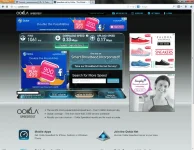
di po sa Speedtest nababase ang BILIS, sa EXPERIENCE mo po yanBadtrip Paano ito ma papabilis

di po sa Speedtest nababase ang BILIS, sa EXPERIENCE mo po yan
________________________
di ko talaga magawa i think this is not for mekakaingit kasi mga Speed ng Downloads niyo :arghh:
ok sir xsilent,maraming salamat po sa info.try ko yan pag di na busy.
ok sir,try ko yn.salamuch po
EDIT: sir,panu ba to paganahin?di ako makaconnect
wew ang bibilis ng speed nila, d ako maka habol, pa declare nyong mods nyo
Paki update nga bro jamesiswizard_1 yung link na ito
You do not have permission to view the full content of this post. Log in or register now.
change mu sir yung zero to letter "o" sa word na d0wnl0ad
Thanks.
bakit ndi ko magawa :'(
May Tutorial po ako dito for CPROXY+Proxifier
Tutorial - Cproxy - disposable mails (12-12-14 - new domains)
hanapin mo lang po
walang ganyan sa chrome ko yung enable ipv6 helppppppp :'(
bro ndi ko magawa :'(
View attachment 12977 bakit walang nakalagay ?
sige po sir,maraming salamat ulit
tignan mo daw bro sa adapter mo if meron bang ipv6
walang ano man po
meron sya bro ipv6
ok na yan bro
ito bro meron naman View attachment 12978
anu next dyan brother nganga na ako yung sonic proxy ba gagamitin pa kasi nadedetect yung ng antivirus ko
indi hehehe.. VPN lang
ganun na yun ? ahahahha
anung pasword sa sonicproxy?
'
jamesiswizard_1
Ano to :shifty:
Hihi Joke Lang
Badtrip Paano ito ma papabilis
di po sa Speedtest nababase ang BILIS, sa EXPERIENCE mo po yan
salamat sa lahat ng feed back.,at mga follow up.,
aw yun lng pla salamatjamesiswizard_1
sir tanung ko lang po d po b to pwede sa 622 at dv235t gamitin tricks mo?Checking if your Windows computer has the 5 GHz network band capability
Step 1:
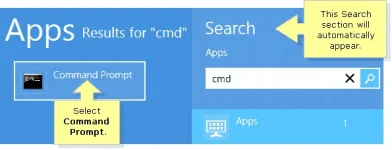
Press the Windowskey on your keyboard to access the Start screen. Type “cmd” until the search result appears under the Apps list. Select Command Prompt to open the application.
IMPORTANT: For Windows 8.1 you can right-click the Startbutton. Click Run then enter “cmd” on the field and press [Enter].
NOTE: For touch-enabled computers, swipe from the right side of the screen to reveal the Charms bar with the system commands.
QUICK TIP: The Search section will automatically appear once you type in any character from your keyboard.
Step 2:
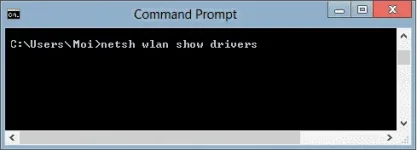
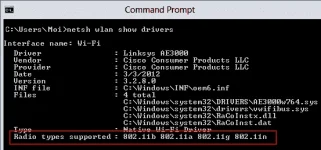
On the Command Prompt window, enter “netsh wlan show drivers” then press [Enter].
Step 3:
Look for the Radio types supported section. If it says that the network adapter supports 802.11a or 802.11n network modes, this means that the computer that you are using has the 5 GHz network capability.
In this example, the wireless adapter supports 802.11b, 802.11a, 802.11g, and 802.11n network modes. This means that the computer has the 5 GHz network band capability.
Windows 7/Vista
NOTE: A built-in wireless network adapter of a laptop computer is used for this example.
Step 1:
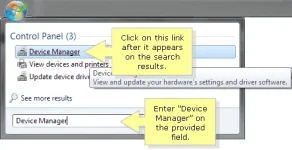
Click the Pearlbutton then enter “Device Manager” on the Search programs and files field. Click the Device Manager link once it appears on the search results.
Step 2:
On the Device Manager window, click Network adapters. Look for the name of your wireless adapter and check if it shows ABGN or AGN.
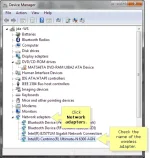
In this example, the wireless adapter is Intel(R) Centrino(R) Ultimate-N 6300 AGN. This means that the computer has the 5 GHz network band capability.
Windows XP
IMPORTANT: A built-in wireless network adapter of a laptop computer is used for this example.
Step 1:
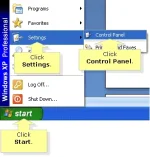
Click Start > Settings > Control Panel.
Step 2:
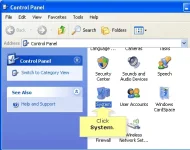
On the Control Panel window, double-click the System icon.
Step 3:
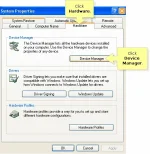
On the System Properties dialog box, click Hardware tab then click Device Manager.
Step 4:
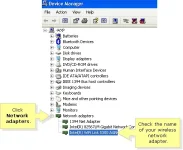
On the Device Manager window, click Network Adapters. Look for the name of your wireless adapter and check if it shows ABGN or AGN.
In this example, the wireless adapter is Intel® WiFi Link 5300 AGN. This means that the computer has the 5 GHz network band capability.
NOTE: To identify Linksys dual-band routers and devices that support both 2.4 GHz and 5 GHz bands, click here. For instructions on checking if your Mac computer is compatible with the 5 GHz frequency, click here.
Do you have a Linksys dual-band wireless router?
Linksys dual-band routers support both 2.4 GHz and 5 GHz networks. You can use both networks simultaneously or use just one (1). Choosing between the two (2) frequencies will enhance the application you will be using on the wireless network. To know more about differentiating the 5 GHz and 2.4 GHz bands, click here.
Some of My Old Tricks but Still Kicking and Helpful click nyo lang yung nasa baba nito.,
OLD TRICKS But Still Kicking
aw yun lng pla salamat
tol bat di mo na lang subukan.,wala itong negative.,si
sir tanung ko lang po d po b to pwede sa 622 at dv235t gamitin tricks mo?
panu pla gmitin ang sonic proxy?tol bat di mo na lang subukan.,wala itong negative.,
same as cproxy lang.,isasabay mo langpanu pla gmitin ang sonic proxy?
ayos pati picture need pa I klik pa ra MakitaPaano Pablisin Ito :grumpy:
Mabilis na nga yan Sir tingnan mo ung sakin nakakaiyakayos pati picture need pa I klik pa ra Makita
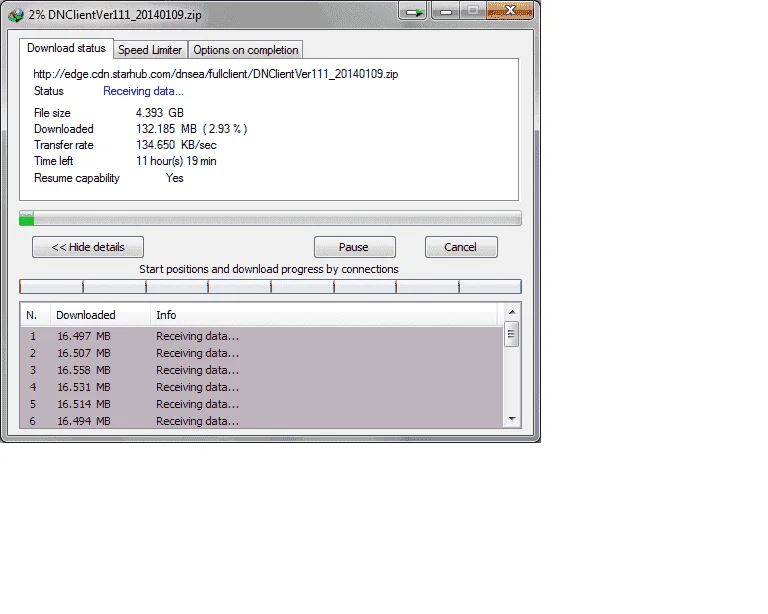
parang ok naman ah.,kung nagawa mo na yung tutorial yan na siguro pinaka mabilis mo.,