PH
PHTutorial for SMARTBRO GREENPACKET 235t WIMAX Working din xa s TRIBO AND GLOBOBO
Requirements
Sempre ang MODEM Greenpacket
activated telnet or putty "if marunong k po gumamit"
Gud Working Macs
Mac Password calculator "Wimax tools etc."
Basic Knowledge on typing or being really good at You do not have permission to view the full content of this post. Log in or register now. METHOD
AYAN NA INILABAS NA MGA POGI!
ADMIN FIRMWARE:
You do not have permission to view the full content of this post. Log in or register now.
FTP site Nigeria Firmware : optional
You do not have permission to view the full content of this post. Log in or register now.
Step 1
RESET YOUR MODEM TO DEFAULT BY PRESSING THE RESET BUTTON FOR 60Secs
iRESET ANG MODEM S DEFAULT PINDUTIN LAMANG ANG RESET SA LOOB NG 60Secs
You do not have permission to view the full content of this post. Log in or register now.
Go to the GP Web gui
Pasok k lng s web gui
"in my case GP Smartbro is by 192.168.15.1" Iba iba kc s TRIBO AT GLOBOBO
USER: smart PASS: smart

Step 3
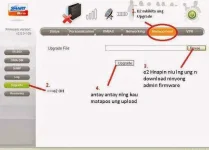
Go to UGRADE then Select the ADMIN FIRMWARE that you downloaded earlier
Pumunta s UPGRADE FIRMWARE piliin ninyo ang na Download na ADMIN FIRMWARE
Step 4
The Webgui site will change into 10.1.1.254 You do not have permission to view the full content of this post. Log in or register now. if the GUI is GREENPACKET DEFAULT MODEM
Mag IIba na ang webgui site ninyo at mgging 10.1.1.254 Tingnan kung GREENPACKET N ANG DEFAULT NG MODEM
USER:admin PASS:admin
Step 5
OPEN CMD ON ADMIN PRIVELEDGES
Buksan ang CMD ang ADMIN MODE
Step 6
GO in to TELNET for your modem
PUMASOK SA TELNET ng MODEM
type: telnet <enter>
type: o 192.168.0.254 <enter>
login: admin <enter>
password: admin <enter>
type:enable <enter>
type:router <enter>
type:wan mac < d2 niu ilalagay ung MAC XX:XX:XX:XX:XX:XX> <enter>
type: commit <enter>
type: exit <enter>
FOR SMART WIMAX MACS
type: wimax <enter>
type: wmx freq add 2337500 10 <enter>
type: wmx freq add 2347500 10 <enter>
type: wmx freq add 2357500 10 <enter>
type: wmx freq add 2345000 10 <enter>
type: wmx freq add 2355000 10 <enter>
type: wmx freq add 2365000 10 <enter>
type:commit
type:exit:
type reboot
FOR GLOBE WIMAX MACS
type: wimax <enter>
type: wmx freq add 2505000 10 <enter>
type: wmx freq add 2507500 10 <enter>
type: wmx freq add 2510000 10 <enter>
type: wmx freq add 2602000 10 <enter>
type: wmx freq add 2612000 10 <enter>
type: wmx freq add 2622000 10 <enter>
type: wmx freq add 2638000 10 <enter>
type: commit <enter>
type: wmx widescan You do not have permission to view the full content of this post. Log in or register now. <enter>
type: commit <enter>
type: exit <enter>
type: reboot <enter>
Step 7 OPEN WEBGUI ON YOUR 10.1.1.254 USER:admin PASS:admin
Pasukin ulit ang webgui 10.1.1.254 USER:admin PASS:admin
Step 8 Change the Frequency
Palitan ang Frequency
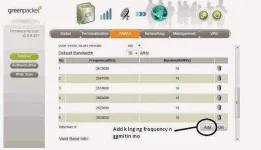
Step 9
Change the Authentication
Palitan ang Authentication
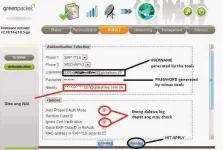
Step 10
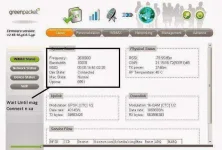
Wait Until It connect
antayin nlng comunect
DV-235t Mac Changer by khimwel
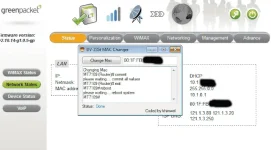
You do not have permission to view the full content of this post. Log in or register now.
-dipo sakin yan nabangit na tuts sa itaas pinasa lang di ko po sana ipopost..
about sa mac wag kayo mag tatanong sakin :v mag scan nalang kayo sa angry IP (dapat connected saka kayo mag generate kung kaya)
Requirements
Sempre ang MODEM Greenpacket
activated telnet or putty "if marunong k po gumamit"
Gud Working Macs
Mac Password calculator "Wimax tools etc."
Basic Knowledge on typing or being really good at You do not have permission to view the full content of this post. Log in or register now. METHOD
AYAN NA INILABAS NA MGA POGI!
ADMIN FIRMWARE:
You do not have permission to view the full content of this post. Log in or register now.
FTP site Nigeria Firmware : optional
You do not have permission to view the full content of this post. Log in or register now.
Step 1
RESET YOUR MODEM TO DEFAULT BY PRESSING THE RESET BUTTON FOR 60Secs
iRESET ANG MODEM S DEFAULT PINDUTIN LAMANG ANG RESET SA LOOB NG 60Secs
You do not have permission to view the full content of this post. Log in or register now.
Go to the GP Web gui
Pasok k lng s web gui
"in my case GP Smartbro is by 192.168.15.1" Iba iba kc s TRIBO AT GLOBOBO
USER: smart PASS: smart
Step 3
Go to UGRADE then Select the ADMIN FIRMWARE that you downloaded earlier
Pumunta s UPGRADE FIRMWARE piliin ninyo ang na Download na ADMIN FIRMWARE
Step 4
The Webgui site will change into 10.1.1.254 You do not have permission to view the full content of this post. Log in or register now. if the GUI is GREENPACKET DEFAULT MODEM
Mag IIba na ang webgui site ninyo at mgging 10.1.1.254 Tingnan kung GREENPACKET N ANG DEFAULT NG MODEM
USER:admin PASS:admin
Step 5
OPEN CMD ON ADMIN PRIVELEDGES
Buksan ang CMD ang ADMIN MODE
Step 6
GO in to TELNET for your modem
PUMASOK SA TELNET ng MODEM
type: telnet <enter>
type: o 192.168.0.254 <enter>
login: admin <enter>
password: admin <enter>
type:enable <enter>
type:router <enter>
type:wan mac < d2 niu ilalagay ung MAC XX:XX:XX:XX:XX:XX> <enter>
type: commit <enter>
type: exit <enter>
FOR SMART WIMAX MACS
type: wimax <enter>
type: wmx freq add 2337500 10 <enter>
type: wmx freq add 2347500 10 <enter>
type: wmx freq add 2357500 10 <enter>
type: wmx freq add 2345000 10 <enter>
type: wmx freq add 2355000 10 <enter>
type: wmx freq add 2365000 10 <enter>
type:commit
type:exit:
type reboot
FOR GLOBE WIMAX MACS
type: wimax <enter>
type: wmx freq add 2505000 10 <enter>
type: wmx freq add 2507500 10 <enter>
type: wmx freq add 2510000 10 <enter>
type: wmx freq add 2602000 10 <enter>
type: wmx freq add 2612000 10 <enter>
type: wmx freq add 2622000 10 <enter>
type: wmx freq add 2638000 10 <enter>
type: commit <enter>
type: wmx widescan You do not have permission to view the full content of this post. Log in or register now. <enter>
type: commit <enter>
type: exit <enter>
type: reboot <enter>
Step 7 OPEN WEBGUI ON YOUR 10.1.1.254 USER:admin PASS:admin
Pasukin ulit ang webgui 10.1.1.254 USER:admin PASS:admin
Step 8 Change the Frequency
Palitan ang Frequency
Step 9
Change the Authentication
Palitan ang Authentication
Step 10
Wait Until It connect
antayin nlng comunect
DV-235t Mac Changer by khimwel
You do not have permission to view the full content of this post. Log in or register now.
-dipo sakin yan nabangit na tuts sa itaas pinasa lang di ko po sana ipopost..
about sa mac wag kayo mag tatanong sakin :v mag scan nalang kayo sa angry IP (dapat connected saka kayo mag generate kung kaya)
 thanks..