 PH
PHracky lara
Journeyman
This tuts is on how to Activate your Windows 8.1 Pro / Enterprise!

OPTION #1:
STEPS:
Done!
OPTION #2:
A 054343
B 968884
C 830996
D 505981
E 885621
F 883754
G 975792
H 926443
OPTION #1:
STEPS:
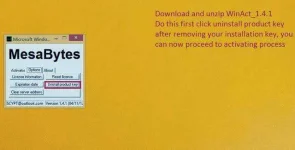
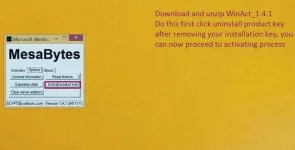
- REMOVE installation key first follow this Screen Shots Download WinAct
- [ You do not have permission to view the full content of this post. Log in or register now. ] then Run
- Download ac†ïvâ†ør [ You do not have permission to view the full content of this post. Log in or register now. ]
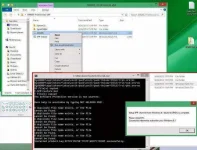
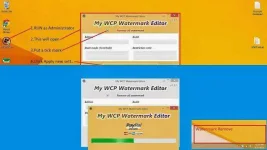
- Right click A9600E (from enterprise or pro.) and select run as administrator follow my screen shot below
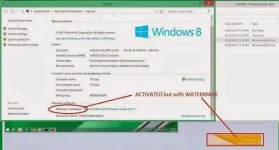
- Check your Computer properties looks like this
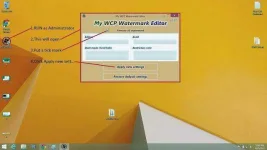
- Download and Unzip My_WCP_watermark_editor.zip [ You do not have permission to view the full content of this post. Log in or register now. ]
- follow Screen Shot below and wait to complete the Processed
Done!
OPTION #2:
- Download W8.1 Pro [ Download Link ]
- REMOVE installation key first follow this Screen ShotsDownload WinAct
- [ You do not have permission to view the full content of this post. Log in or register now. ] then Run
- Run CMD as Administrator
type SLUI 3 enter this serial key
NTTX3-RV7VB-T7X7F-WQYYY-9Y92F
wait for system to accept the key and prompt that it's done.
- Run CMD as Administrator
type SLUI 4, select UNITED KINGDOM, next you will see your installation I.D this must be appeared in the installation I.D (if NOT DO NOT CONTINUE This process and proceed to the Activation 1)
installation i.d 5798411 5450483 2943601 1243920 6545380 2885066 9612621 9251254 1949360
- Click ENTER CONFIRMATION I.D and enter to fields this confirmation
A 054343
B 968884
C 830996
D 505981
E 885621
F 883754
G 975792
H 926443
- Click ACTIVATE WINDOWS and wait for the process to finish and prompt saying "Thanks, you're all done." then click Close and restart.
- If you still have watermark, Just use watermark remover [ You do not have permission to view the full content of this post. Log in or register now. ]
- Done!