 PH
PH-
Welcome to PHCorner Forums! Sign up for free to unlock full access and exclusive privileges, including:
- Asking questions about computer and mobile issues
- Discovering internet tips for your mobile network and computer
You are using an out of date browser. It may not display this or other websites correctly.
You should upgrade or use an alternative browser.
You should upgrade or use an alternative browser.
🔒 Closed Patulong po nagkavirus laptop ko
- Thread starter UNiVeRsE
- Start date
-
- Tags
- virus virus ads pop up
- Status
- Not open for further replies.
nardthegreat
Honorary Poster
Backup mo nalang important files mo at ireformat mo nalang yang lappy mo
arsenal1205
Rarely opens PHC
Removal of goodcaster virus
- On the Start
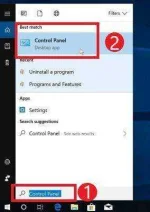
 menu, type Control Panel in the search box and select “Control Panel” from the results.
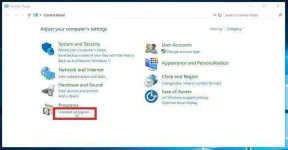
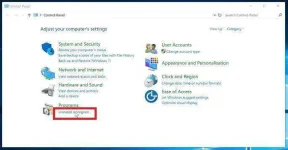
- When the “Control Panel” window opens click on the “Uninstall a program” option under “Programs” category.
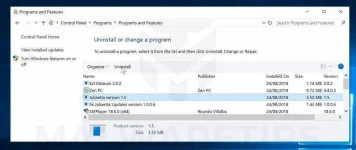
- Find the malicious program and uninstall it.
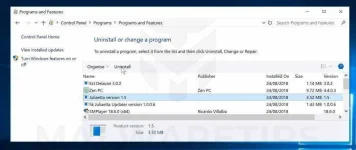
The “Programs and Features” screen will be displayed with a list of all the programs installed on your PC. Scroll through the list until you find the malicious program, then click to highlight it, then click the “Uninstall” button that appears on the top toolbar.
Known malicious programs: Juliaetta version 1.5, Wajam, 1.0.0.1, DNS Unlocker, Cinema Plus, Price Minus, SalesPlus, New Player, MediaVideosPlayers, Browsers_Apps_Pro, PriceLEess, Pic Enhance, Sm23mS, Salus, Network System Driver, SS8, Save Daily Deals, Word Proser, Desktop Temperature Monitor, CloudScout Parental Control, Savefier, Savepass, HostSecurePlugin, CheckMeUp or HD-V2.2.
The malicious program may have a different name on your computer. If you cannot find any malicious programs on your PC, you can skip to the next step
- Follow the on-screen prompts to uninstall the program.
In the next message box, confirm the uninstall process by clicking on Yes, then follow the prompts to uninstall the program.
Make sure to read all of the prompts carefully, because some malicious programs try to sneak things in hoping that you won’t read closely.
Nagawa ko na po yan bumalik lang po yung viruscredits from: You do not have permission to view the full content of this post. Log in or register now.
- On the Start
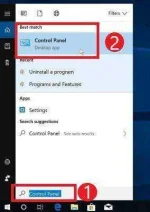
menu, type Control Panel in the search box and select “Control Panel” from the results.
- When the “Control Panel” window opens click on the “Uninstall a program” option under “Programs” category.
- Find the malicious program and uninstall it.
The “Programs and Features” screen will be displayed with a list of all the programs installed on your PC. Scroll through the list until you find the malicious program, then click to highlight it, then click the “Uninstall” button that appears on the top toolbar.
Known malicious programs: Juliaetta version 1.5, Wajam, 1.0.0.1, DNS Unlocker, Cinema Plus, Price Minus, SalesPlus, New Player, MediaVideosPlayers, Browsers_Apps_Pro, PriceLEess, Pic Enhance, Sm23mS, Salus, Network System Driver, SS8, Save Daily Deals, Word Proser, Desktop Temperature Monitor, CloudScout Parental Control, Savefier, Savepass, HostSecurePlugin, CheckMeUp or HD-V2.2.
The malicious program may have a different name on your computer. If you cannot find any malicious programs on your PC, you can skip to the next step
- Follow the on-screen prompts to uninstall the program.
In the next message box, confirm the uninstall process by clicking on Yes, then follow the prompts to uninstall the program.
Make sure to read all of the prompts carefully, because some malicious programs try to sneak things in hoping that you won’t read closely.
pano po magreformat ng walang cdBackup mo nalang important files mo at ireformat mo nalang yang lappy mo
arsenal1205
Rarely opens PHC
the best option is reformat na lang yung laptopNagawa ko na po yan bumalik lang po yung virus
arsenal1205
Rarely opens PHC
use usb kung meron ka download ka ng windows iso and create bootable usb using rufuspano po magreformat ng walang cd
nardthegreat
Honorary Poster
Mag bootable usb ka nalang. Need mo ng almost 8gb flashdrive. Search ka naalang sa google ng tutorial how to format using bootable usbpano po magreformat ng walang cd
- Status
- Not open for further replies.
Similar threads
-
-
❓ Help Mga bossing patulong po nahäçk account ko due to carelessness
- Started by Jeii
- Replies: 4
-
-
👥 Referral Passive Earning Apps: "Lugi ba sa kuryente kung i-o-on ko magdamag ang PC/Laptop ko?"
- Started by pnoygeekster
- Replies: 1
-
Feel ko may virus laptop ko, what should I do?
- Started by Fallen1001
- Replies: 29
About this Thread
-
10Replies
-
897Views
-
4Participants
Last reply from:
UNiVeRsE
UNiVeRsE
New Topics
-
Anong Site suggested na paying
- Started by hackmeifyoucan1992
- Replies: 1
- ❓ Internet Questions
-
Dns adguard, pabulong
- Started by Peenoisekun
- Replies: 0
- ❓ Internet Questions
-
Pasabit po capcut
- Started by Mosiahid usop
- Replies: 0
- ❓ Internet Questions
-
How stop V2K technology
- Started by buscato
- Replies: 0
- ❓ Internet Questions
-
Yung nag ng save link
- Started by Master_butin
- Replies: 1
- ❓ Internet Questions
-
Meron pa ba nagbebenta ng TNT/ SMART Sim na may UNLI DATA promo?
- Started by BlacKat
- Replies: 1
- ❓ Internet Questions
-
Openline 5g Modem with Outdoor Antenna sa Shopee
- Started by BlacKat
- Replies: 0
- ❓ Internet Questions
-
Company Laptop hotspot
- Started by Meowshi
- Replies: 0
- ❓ Internet Questions
-
Help sa Airgeddon for windows
- Started by foxholeden
- Replies: 0
- ❓ Internet Questions
-
U.A.E free internet
- Started by Hubitz22
- Replies: 0
- ❓ Internet Questions
Trending Topics
-
Sino Nakaranas Sa Telegram Nag-aalok ng task pero nagbibigay nila agad 120 pesos sa una
- Perlando16
Replies: 36 -
-
-
-
-
-
-
-
Online now
- Members online
- 1,094
- Guests online
- 11,440
- Total visitors
- 12,534