🔒 Closed KeyFinder - The Magical Jelly Bean

Status
Not open for further replies.

richardrr

Established
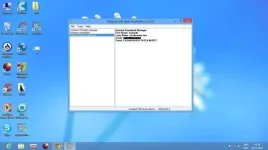
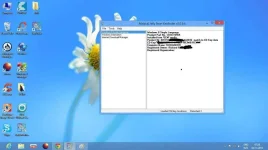
The Magical Jelly Bean Keyfinder is a freeware utility that retrieves your Product Key (cd key) used to install windows from your registry. It also has a community-updated configuration file that retrieves product keys for many other applications. Another feature is the ability to retrieve product keys from unbootable Windows installations.
1-jpg.10654

2-jpg.10652

Magical Jelly Bean Keyfinder features:
  1. An optional config file - this functionality lets you pull a key stored in the registry for any software. A sample config file is included in the zip and can be seen here: You do not have permission to view the full content of this post. Log in or register now.
  2. Command line options - /save <location> /savecsv <location> /close /hive <location> /file <filename>
  3. Load Hive option - allows you to load the registry hive of another Windows installation. To use, put the hard drive in a working machine (must also be Windows 2000, XP, Vista, Windows 7 or Windows 8) or use Windows PE (not tested, should work) and click Load Hive. Then point it to the dead Windows install. If you're using Windows Vista, Administrator rights are required for this feature. You may have to right click on the Keyfinder and run as Administrator.
  4. Improved Save & Print! - save & print options will now include all keys. Save is also available in text or CSV.
DOWNLOAD Magical Jelly Bean Keyfinder
Password: richardrr
 

Attachments

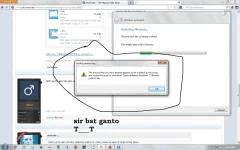
ni-run ko po yung app, then yung lumabas na code para sa cd key yun yung nilagay ko dun, tapos ganun po yung lumalabas...
 
ni-run ko po yung app, then yung lumabas na code para sa cd key yun yung nilagay ko dun, tapos ganun po yung lumalabas...
keyfinder lang po ito
that retrieves your Product Key..
naka insert na po sa system
ang serial na nasearch mo..
 
ay... sige po, salamat po ulit :)
haha, hindi ko po kasi alam kung ano nang gagawin ko dito sa laptop para ma re activate siya...
salamat po ulit, ahehe sorry po sa abala...
 
ay... sige po, salamat po ulit :)
haha, hindi ko po kasi alam kung ano nang gagawin ko dito sa laptop para ma re activate siya...
salamat po ulit, ahehe sorry po sa abala...
gamitin niyo po
ac†ïvâ†ør na nasa attachment..
Run as admin niyo lang then after
magrestart activated na Win 7 niyo..

please feedback if it works..
 

Attachments

gamitin niyo po
ac†ïvâ†ør na nasa attachment..
Run as admin niyo lang then after
magrestart activated na Win 7 niyo..

please feedback if it works..
maraming maraming salamat po talaga sa iyo idol, sige po susubukan ko na po, feedback nalang po ako
 
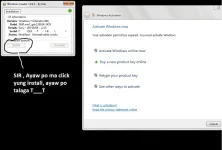
sir, ganito po yung lumabas nung inopen ko yung file, ayaw po ma click yung install, nka disconnect po ako sa internet, tapos po inopen ko yung application, then ganyan po yung lumabas, tnry ko na din po i restart kahit hindi ko na click yung install, pero wala po talaga, pasensya po talaga at hindi ko po mapagana
sige po..
wait ko feedback mo ah..
disconnect internet
before running the application ah..
 

Attachments

  • ayaw ....webp
    ayaw ....webp
    43.1 KB · Views: 6
Status
Not open for further replies.

Similar threads

About this Thread

  • 14
    Replies
  • 795
    Views
  • 4
    Participants
Last reply from:
elarcoiri

Trending Topics

Online now

Members online
821
Guests online
1,709
Total visitors
2,530

Forum statistics

Threads
2,295,904
Posts
29,102,071
Members
1,206,071
Latest member
SeeEmC
Back
Top