 PH
PHWindows 8.1 KMS Ac†ïvâ†ør
Credits to AR_Alex
- From: richardrr of phcorner.org
Activate Windows 8.1 using Windows 8.1 KMS Ac†ïvâ†ør
Currently the Ac†ïvâ†ør support these editions:
Windows 8.1 Pro
Windows 8.1 Pro N
Windows 8.1 Enterprise
Windows 8.1 Enterprise N
Windows Server 2012 R2 Server Standard
Windows Server 2012 R2 Datacenter
Windows Server 2012 R2 Essentials
Office 2013 Professional Plus
Office 2013 Standard
Project 2013 Professional
Project 2013 Standard
Visio 2013 Professional
Visio 2013 Standard
How to use this?
Follow this step-by-step guide to activate your Windows 8.1 software:
Important:
You should be connected to the internet to perform this Activation!
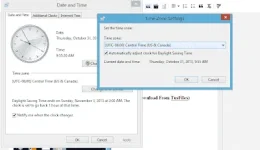
1. Change your timezone to (UTC-06:00) Central Time (US & Canada)
2. Extract the downloaded file to your desktop using Winrar.
3. Open the folder of the extracted file that was downloaded.
4. 'Run' the software named "Windows 8.1 KMS Ac†ïvâ†ør V1.4.exe" with administrator privileges...
5. Choose selection number 1 by typing 1 and hitting Enter key to get to the Windows 8.1 Activation Menu
and choose what version of windows 8 you are running..
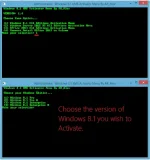
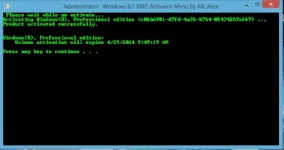
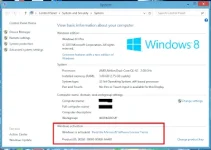
6. Input the number of the version you are running windows 8.1 and hit enter.
Credits to AR_Alex
- From: richardrr of phcorner.org
Credits to AR_Alex
- From: richardrr of phcorner.org
Activate Windows 8.1 using Windows 8.1 KMS Ac†ïvâ†ør
Currently the Ac†ïvâ†ør support these editions:
Windows 8.1 Pro
Windows 8.1 Pro N
Windows 8.1 Enterprise
Windows 8.1 Enterprise N
Windows Server 2012 R2 Server Standard
Windows Server 2012 R2 Datacenter
Windows Server 2012 R2 Essentials
Office 2013 Professional Plus
Office 2013 Standard
Project 2013 Professional
Project 2013 Standard
Visio 2013 Professional
Visio 2013 Standard
How to use this?
Follow this step-by-step guide to activate your Windows 8.1 software:
Important:
You should be connected to the internet to perform this Activation!
1. Change your timezone to (UTC-06:00) Central Time (US & Canada)
2. Extract the downloaded file to your desktop using Winrar.
3. Open the folder of the extracted file that was downloaded.
4. 'Run' the software named "Windows 8.1 KMS Ac†ïvâ†ør V1.4.exe" with administrator privileges...
5. Choose selection number 1 by typing 1 and hitting Enter key to get to the Windows 8.1 Activation Menu
and choose what version of windows 8 you are running..
6. Input the number of the version you are running windows 8.1 and hit enter.
Credits to AR_Alex
- From: richardrr of phcorner.org