 PH
PHjeleeah_30
Honorary Poster
If you’re using a Samsung Android smartphone, and if you don’t have the time, patience or computer skills to install and update the ADB driver manually, you can do it automatically with Driver Easy.
Driver Easy will automatically recognize your system and find the correct driver for it. You don’t need to know exactly what system your computer is running, you don’t need to risk downloading and installing the wrong driver, and you don’t need to worry about making a mistake when installing.
1)Download and install Driver Easy.
You do not have permission to view the full content of this post. Log in or register now.
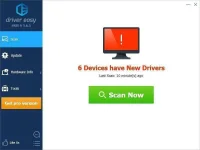
2)Run Driver Easy and click Scan Now button. Driver Easy will then scan your computer and detect any problem drivers.
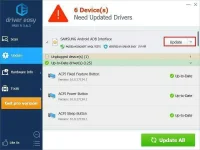
3)Click the Update button next to the ADB driver to automatically download and install the correct version of this driver, then you can manually install it. Or click Update All to automatically download and install the correct version of all the drivers that are missing or out of date on your system (this requires the Pro version – you’ll be prompted to upgrade when you click Update All).
Driver Easy will automatically recognize your system and find the correct driver for it. You don’t need to know exactly what system your computer is running, you don’t need to risk downloading and installing the wrong driver, and you don’t need to worry about making a mistake when installing.
1)Download and install Driver Easy.
You do not have permission to view the full content of this post. Log in or register now.
2)Run Driver Easy and click Scan Now button. Driver Easy will then scan your computer and detect any problem drivers.
3)Click the Update button next to the ADB driver to automatically download and install the correct version of this driver, then you can manually install it. Or click Update All to automatically download and install the correct version of all the drivers that are missing or out of date on your system (this requires the Pro version – you’ll be prompted to upgrade when you click Update All).