 PH
PHJust encounter this problem with my Girl Friend Flash Drive and come up with this solution, credits to shoobmphc.onl/#forbidden#
If the files and folders in your external hard disk or flash drive have turned into shortcuts or are hidden, here is one solution to recover your data. Operating system used – Windows 7.
If the files and folders in your external hard disk or flash drive have turned into shortcuts or are hidden, here is one solution to recover your data. Operating system used – Windows 7.
- Install good antivirus and scan entire computer including the flash drive/external hard disk.
- Go to Control Panel, Folder Options, select VIEW tab, select ”Show hidden files, folders and drives” and uncheck ”Hide protected operating system files (recommended)” now click APPLY
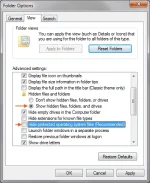
Folder Options
- Open command prompt (press Win+R, type cmd, press enter), assuming ‘G:‘ as the letter of affected drive, enter this command-
replace ‘g:’ with other drive letter if needed.Code:attrib -h -r -s /s /d g:\*.*


