 PH
PHA N X I E T Y
Eternal Poster
D ako makaconnect sa mobile hotspot gamit ko laptop Acer Aspire 5570 windows 7


Walang onboard device nakalagu dito bosnanyare paps
nacheck muna sa bios?
walang wlan paps, search mo maigi baka nakatago yan nalang pag asa baka naka disabled dunWalang onboard device nakalagu dito bos
Pwede palink non Yung compatible laptop ko ?Try mo i-update yung driver

Nakalagay Lang ksi dito is informationwalang wlan paps, search mo maigi baka nakatago yan nalang pag asa baka naka disabled dun
Pwede palink non Yung compatible laptop ko ? View attachment 500008
Pwede po ba palink naalng ?try mo nalang hanap ulit yung network drivers for acer yung pang 32 bit
Pwede po ba palink naalng ?
Yung intel wireless ba? Iddl ko?padouble check exact model paps
You do not have permission to view the full content of this post. Log in or register now.
or
You do not have permission to view the full content of this post. Log in or register now.
Naka enable sya pero may X pden.Tingin ko na disable lang, hmnn right click mo yang wlan adapter then click enable kong naka disable , kapag wala update mo driver ng wlan gamit ka nalang driver pack kong meron ka

Yung intel wireless ba? Iddl ko?
tignan naten din via cmd
run as administrator tas type mo
netsh interface show interface
View attachment 500044
tas pag nakadisable hanapin mo yung wireless at type
netsh interface set interface "YOUR-ADAPTER-NAME" enable
sample lang:
netsh interface set interface Wireless Network Connection enable
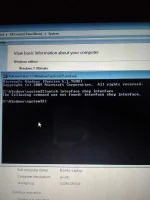
typo ka paps show dapat shop natype mo
mukhang ok nga naman, sa BIOS ba kanina may Startup Configuration kang napansin?

