 PH
PHronnieverse
Fanatic
In our rooting seasons today I am going to help you to root another Lenovo Phone and that is Lenovo Vive Z2 Pro ROW Version. Lenovo Vibe Z2 Pro which is also know as Lenovo K920 is really great looking phone by lenovo with great feature and specs, so if you own a Lenovo Vibe Z2 Pro oe Lenovo K920 and thinking to root your phone then you are at right place. Rooting android phone is always thrilling, so if this is your first rooting then know about rooting properly like pros and cons as I always say. Here I want to mention that rooting a android device violates the terms and conditions of warranty and make a proper backup of all your data SMS contacts ect.

So we are going to start rooting Lenovo Vibe Z2 Pro ROW Version or Lenovo K920, before taking any steps read the whole article properly.
NOTE: This tutorial is for experimental purpose, we are not responsible for any damage of your phone. THIS METHOD IS FOR ROW VERSION OF LENOVO VIBE Z2 PRO or LENOVO K920, DON’T TRY ON CHINESE VERSION
Rooting Lenovo Vibe Z2 Pro or Lenovo K920 has two methods according to its Android version. So choose the method according to your android version.
How To Root Lenovo Vibe Z2 Pro or root Lenovo K920
Method 1: For Android 5.0.2 Version
Method 2: For Android Android 4.4.2 Version
Sorry, we don’t have genuine method at this moment. we will update this as soon as we have working method to root Lenovo Vibe Z2 Pro Android version 4.4.2.

So we are going to start rooting Lenovo Vibe Z2 Pro ROW Version or Lenovo K920, before taking any steps read the whole article properly.
NOTE: This tutorial is for experimental purpose, we are not responsible for any damage of your phone. THIS METHOD IS FOR ROW VERSION OF LENOVO VIBE Z2 PRO or LENOVO K920, DON’T TRY ON CHINESE VERSION
Rooting Lenovo Vibe Z2 Pro or Lenovo K920 has two methods according to its Android version. So choose the method according to your android version.
How To Root Lenovo Vibe Z2 Pro or root Lenovo K920
Method 1: For Android 5.0.2 Version
- Download this file root_twrp_K920Pro_Android5.zip (38.8 MB)
- Download You do not have permission to view the full content of this post. Log in or register now.
- Download You do not have permission to view the full content of this post. Log in or register now.
- Install LenovoUSBDriver and Oqalcomm USB driver on your PC then restart your PC
- Turn on USB Debugging” by going Settings>>About Phone>>Device Info, then press 10 times (not to be mistaken) on the version number.
- Now Connect your Lenovo Vibe Z2 Pro to your PC as a media device (MTP) via USB cable ( Make sure USB debugging enabled)
- Unzip the root_twrp_K920Pro_Android5.zip in a folder
- Inside the folder you will get a file 0_install_root_K920Pro.bat and some other bat file
- Just right click on 0_install_root_K920Pro.bat and select Run as administratorYou do not have permission to view the full content of this post. Log in or register now.
- It will automatically root your Lenovo K920, so wait till CMD will show “Press any key” like this
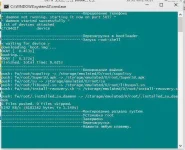
- Now just disconnect your Phone and close the CMD windows
- Your Lenovo Vibe Z2 Pro has been rooted
- To check whether it has root access or not just install You do not have permission to view the full content of this post. Log in or register now. and run it
Method 2: For Android Android 4.4.2 Version
Sorry, we don’t have genuine method at this moment. we will update this as soon as we have working method to root Lenovo Vibe Z2 Pro Android version 4.4.2.