 PH
PHronnieverse
Fanatic
The dual camera sensation of Xiaomi with portrait mode continues with the new Xiaomi Redmi Note 5 Pro. If you are looking for a budget camera phone with great battery and preformation the Redmi Note 5 Pro is no doubt the best option. But today I am going to discuss how to root Redmi Note 5 Pro. Before you root your Redmi Note 5 Pro make sure you take proper knowledge and precaution. So if you are interested then follow this article to root Redmi Note 5 Pro.

Warning: Flashing can potentially brick or bootloop your device. We don’t hold any responsibility for any error or problem caused by following this guide. Do with your own risks. This root method for all RAM variant of Redmi Note 5 Pro.
How to Root Redmi Note 5 Pro
NOTE: Make a backup of all your data including msg, contacts files, images etc.
A. Download Tools
Warning: Flashing can potentially brick or bootloop your device. We don’t hold any responsibility for any error or problem caused by following this guide. Do with your own risks. This root method for all RAM variant of Redmi Note 5 Pro.
How to Root Redmi Note 5 Pro
NOTE: Make a backup of all your data including msg, contacts files, images etc.
A. Download Tools
- Download and install You do not have permission to view the full content of this post. Log in or register now.
- Download You do not have permission to view the full content of this post. Log in or register now.
- Download You do not have permission to view the full content of this post. Log in or register now.
- Download You do not have permission to view the full content of this post. Log in or register now. (Don’t unzip it)
- Download You do not have permission to view the full content of this post. Log in or register now. (Don’t unzip it)
- Download You do not have permission to view the full content of this post. Log in or register now.
- Install the ADB Driver in your PC and reboot it
- Unzip ADB.zip and you will get ADB Folder
- Rename twrp-whyred-08032018.img to twrp.img
- Now copy paste the twrp.img inside the ADB Folder
- Enable Developer option- Goto Settings > About phone > tap MIUI version 7 times.
- Enable USB Debugging- Goto Settings > Additional settings > Developer options > USB Debugging and enable it.
- Enable OEM Unlock – Goto Settings > Additional settings > Developer options > Enable OEM Unlock.
- Enable MI Unlock- Goto Settings > Additional settings > Developer options > tap on MI Unlock Status and then tap on Add account and device. This will bind your device with MI account if you don’t have Mi account the make a Mi account using your phone number, not email.
- Go to You do not have permission to view the full content of this post. Log in or register now., Sign in with your Mi ID and request for Bootloader unlock with proper reason.
- You will get confirmation on your mobile via SMS after few days.
- Once you get confirmation Unzip the miflash_unlock-en-2.3.803.10.zipfile
- Run the MiFlashUnlock.exe , and sign in with your Mi-Account
- Shut down your phone manually.
- Now hold Volume down key and Power button to enter Fastboot mode;
- Connect your phone to PC using USB cable and click “Unlock”.
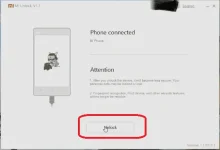
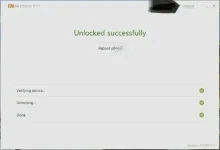
- Once the unlock process completed just hit the reboot button
- Enable Developer option- Goto Settings > About phone > tap MIUI version 7 times.
- Enable USB Debugging- Goto Settings > Additional settings > Developer options > USB Debugging and enable it.
- Now connect your Redmi Note 5 Pro to PC via USB cable.
- Copy Paste the Magisk Zip and lazyflasher-no-verity-opt-encrypt.zip to your Phone internal memory
- Open the ADB Folder.
- Inside the folder, hold “Shift” Key then right click and select “Open command Windows here”.
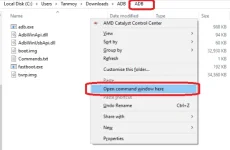
- The Command prompt will open.
- Now switch off your device completely
- Then press and hold Vol Down and Power button until it boots up in fastboot mode.
- Now run the below command. If driver properly installed it will show your device with some alphanumeric character
fastboot devices - Now its time to flash TWRP, so run this command (Make sure twrp.imgfile is present in the ADB folder )
fastboot flash recovery twrp.img - Once the flashing process has completed, press and hold Power + Vol Upbutton unless you see MI logo. It will boot into TWRP Recovery Mode. Now you can disconnect your phone from PC.
- You are now on TWRP, tap on install
- Browse the Magisk zip file and swipe to Install
- Once it has done. Go to TWRP main menu
- Tap on install and choose lazyflasher-no-verity-opt-encrypt.zip
- Once it has done tap on Reboot >>System
- The booting process may take 5 to 10 minutes.
- Install You do not have permission to view the full content of this post. Log in or register now. and You do not have permission to view the full content of this post. Log in or register now. then check whether Redmi 5 Pro rooted or not.