 PH
PHronnieverse
Fanatic
By following the rooting tutorial given here, you can be able to root Vivo X21 Tablet and get the ability to install custom-built Android applications, custom-made recoveries (TWRP or CWM recovery), install custom ROM firmware’s, etc.

Prerequisites:
Step 1: Although the rooting process given here is not a data-loss process, it won’t hurt to have a backup of personal data on your Tablet. So, take a backup before getting started with the rooting tutorial.
Step 2: Make sure that your device has at least 50-60% battery backup in it before getting started with the rooting procedure.
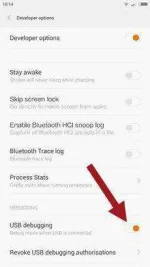
Step 3: Now enable the USB Debugging Mode in your Tablet by following this path: Settings ->Developer Options -> USB Debugging. If you can’t see the developer options in your device Settings, then enable it by following this path: Settings -> About Phone (tap on the Build Number for 5-7 times to enable it).
Step 4: Next, You do not have permission to view the full content of this post. Log in or register now. and install it on your computer so that you can connect your device to PC.
Once you have finished all these preliminary tasks, you can move forward to the rooting tutorial given below.
Tutorial To Root Vivo X21 Using iRoot:
Step 1: To get started, download You do not have permission to view the full content of this post. Log in or register now. (formerly vRoot) and install the application in your computer. Once done, launch iRoot in your PC.
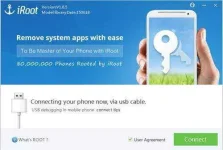
Step 2: Now connect your Tablet to the computer using original USB data cable. If you have installed the USB driver of your device on the computer properly, then iRoot will identify your device.
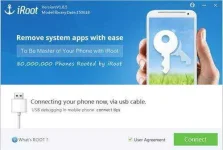
Step 3: Next, click on the green “Root” button to begin the rooting process. Once the rooting process gets completed, your device will automatically reboot.
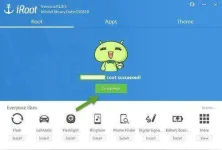
Step 4: Now, click the “Complete” button and unplug your Tablet.
That’s it. Now, you have successfully finished rooting Vivo X21 Tablet using the iRoot One-Click Rooting tool. For confirmation install You do not have permission to view the full content of this post. Log in or register now. for Android in your device and confirm your device’s root privileges.
Prerequisites:
Step 1: Although the rooting process given here is not a data-loss process, it won’t hurt to have a backup of personal data on your Tablet. So, take a backup before getting started with the rooting tutorial.
Step 2: Make sure that your device has at least 50-60% battery backup in it before getting started with the rooting procedure.
Step 3: Now enable the USB Debugging Mode in your Tablet by following this path: Settings ->Developer Options -> USB Debugging. If you can’t see the developer options in your device Settings, then enable it by following this path: Settings -> About Phone (tap on the Build Number for 5-7 times to enable it).
Step 4: Next, You do not have permission to view the full content of this post. Log in or register now. and install it on your computer so that you can connect your device to PC.
Once you have finished all these preliminary tasks, you can move forward to the rooting tutorial given below.
Tutorial To Root Vivo X21 Using iRoot:
Step 1: To get started, download You do not have permission to view the full content of this post. Log in or register now. (formerly vRoot) and install the application in your computer. Once done, launch iRoot in your PC.
Step 2: Now connect your Tablet to the computer using original USB data cable. If you have installed the USB driver of your device on the computer properly, then iRoot will identify your device.
Step 3: Next, click on the green “Root” button to begin the rooting process. Once the rooting process gets completed, your device will automatically reboot.
Step 4: Now, click the “Complete” button and unplug your Tablet.
That’s it. Now, you have successfully finished rooting Vivo X21 Tablet using the iRoot One-Click Rooting tool. For confirmation install You do not have permission to view the full content of this post. Log in or register now. for Android in your device and confirm your device’s root privileges.