 PH
PHSorata Kanda
Journeyman
Napulot ko lang sa net  share ko to sa inyo sana makatulong :happy:
by the way, 1st thread ko to
Mga dapat kakailanganin:
1. USB Flash drive (4GB or up)
2. ISO file or DVD ng may Windows 7 (Note: Dapat Orig yung copy ng Windows7 mo )
3. Windows 7 USB/DVD Tool
Some questions you may ask before doing the procedures:
- Pano idownload ang Windows7 ISO file kung wala kayong DVD installer ng Windows7?
kung binabasa nyo po ang mga comments sa torrent na yan
free naman yan eh)
mawawala? Eh pano ko iinstall ulet ang mga drivers?
May dalawang (2) paraan po na nakalap ako sa internet:
1st - Double Driver
2nd - Driver Solution Software
Double Driver
- Itong software po na to, parang backup lang ng mga drivers mo.
Need mo lang ng backup drive (like USB flash drive)
Easy use lang sya, user friendly. Follow the instructions lang sa software.
Driver Solution Software
- Isang software sia na naka ALL-in-ONE driver installer. Applicable for all Windows OS (XP, Vista, 7) (ewan ko lang po sa Windows 8)
Download nyo sia using Torrent. Pwede nyo din pong hanapin dito sa phcorner.org . May nakita po akong Thread dito na nagbibigay ng free softwares.
Other questions, please feel free to comment
__________________________________________________________________
1st: Set up your Windows 7 installer into your USB Flash Drive
(Note: Dapat walang maiwan na important files sa USB Flash Drive mo dahil ifoformat ito ng software na gamit natin)
Step 1: Pag meron ka na flash drive (4gb) at iso file, download mo yung Windows7 USB/DVD Tool na nakalagay sa Notepad.
Tapos, iinstall nyo po ito.
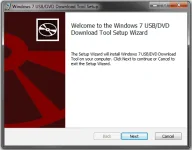
Step 2: Insert mo yung USB drive. Open mo yung software na ininstall mo kanina.
Step 3: Piliin mo yung ISO File na gusto mong iinstall sa USB drive mo. click "Next"
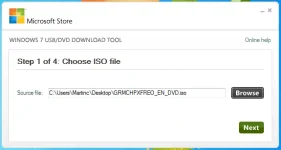
Step 4: Pumili ka ng device kung san mo gustong ilagay ang Windows 7 ISO file, kung sa DVD ba or sa USB drive.
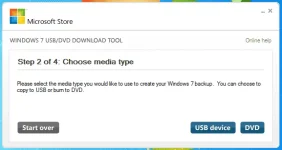
Step 5: Syempre goal natin dito eh mag install using USB drive, so select nyo ang USB device. Then click "Begin copying". Tapos if tatanungin kayo na need ierase yung nasa loob ng USB nyo, just click "Erase USB Device". Then "Yes".
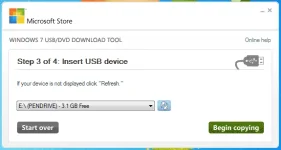
And finally, pwede nang iinstall ang Windows 7 using USB drive.
_____________________________________________________________________________
Pwede din po extract your ISO file using WinRAR
______________________________________________________________
For Windows XP po na nahihirapan iinstall ang Windows 7 USB-DVD tool, download nyo ang Image Mastering API v20 sa attachments
_____________________________________________________________________________
May Windows 7 Loader + Ac†ïvâ†ør din na kasali sa Notepad
credits to the developer ng loader+ac†ïvâ†ør
_____________________________________________________________________________
Kung gusto nyo po mag run ng Windows 7 Original copy but wala kayong License or di naka genuine copy nyo. Remove nyo nalang po ang Windows Ac†ïvâ†ør nya..
Download nyo po ang WAT Remover na andun din sa Notepad
Credits to the häçkers sa torrent ko lang po yan nakalap XD
_____________________________________________________________________________
share ko to sa inyo sana makatulong :happy:by the way, 1st thread ko to
Mga dapat kakailanganin:
1. USB Flash drive (4GB or up)
2. ISO file or DVD ng may Windows 7 (Note: Dapat Orig yung copy ng Windows7 mo
)3. Windows 7 USB/DVD Tool
Some questions you may ask before doing the procedures:
- Pano idownload ang Windows7 ISO file kung wala kayong DVD installer ng Windows7?
Download nyo po using Torrent. Don't worry po walang VIRUS kang makukuha sa Torrent
kung binabasa nyo po ang mga comments sa torrent na yan
Download Torrent Client like UTorrent, BitTorrent etc. (Search nyo nalang po sa google..
free naman yan eh)
- Diba po mawawala ang lahat ng files pag nag reformat? So pati din ang mga driversMay direct link din sa notepad
mawawala? Eh pano ko iinstall ulet ang mga drivers?
May dalawang (2) paraan po na nakalap ako sa internet:
1st - Double Driver
2nd - Driver Solution Software
Double Driver
- Itong software po na to, parang backup lang ng mga drivers mo.
Need mo lang ng backup drive (like USB flash drive)
Easy use lang sya, user friendly. Follow the instructions lang sa software.
- Inupload ko na sa mediafire para madownload nyo. Nasa notepad ang link.
- To install ulet after nyo ma format ang pc/laptop nyo,
(note: kung saang pc/laptop kayo nag backup, dun nyo din irestore ang drivers)insert nyo backup USB drive nyo
open the software
tapos restore
Driver Solution Software
- Isang software sia na naka ALL-in-ONE driver installer. Applicable for all Windows OS (XP, Vista, 7) (ewan ko lang po sa Windows 8)
Download nyo sia using Torrent. Pwede nyo din pong hanapin dito sa phcorner.org . May nakita po akong Thread dito na nagbibigay ng free softwares.
Other questions, please feel free to comment
__________________________________________________________________
1st: Set up your Windows 7 installer into your USB Flash Drive
(Note: Dapat walang maiwan na important files sa USB Flash Drive mo dahil ifoformat ito ng software na gamit natin)
Step 1: Pag meron ka na flash drive (4gb) at iso file, download mo yung Windows7 USB/DVD Tool na nakalagay sa Notepad.
Tapos, iinstall nyo po ito.
Step 2: Insert mo yung USB drive. Open mo yung software na ininstall mo kanina.
Step 3: Piliin mo yung ISO File na gusto mong iinstall sa USB drive mo. click "Next"
Step 4: Pumili ka ng device kung san mo gustong ilagay ang Windows 7 ISO file, kung sa DVD ba or sa USB drive.
Step 5: Syempre goal natin dito eh mag install using USB drive, so select nyo ang USB device. Then click "Begin copying". Tapos if tatanungin kayo na need ierase yung nasa loob ng USB nyo, just click "Erase USB Device". Then "Yes".
And finally, pwede nang iinstall ang Windows 7 using USB drive.
_____________________________________________________________________________
Pwede din po extract your ISO file using WinRAR
______________________________________________________________
For Windows XP po na nahihirapan iinstall ang Windows 7 USB-DVD tool, download nyo ang Image Mastering API v20 sa attachments
_____________________________________________________________________________
May Windows 7 Loader + Ac†ïvâ†ør din na kasali sa Notepad
credits to the developer ng loader+ac†ïvâ†ør
_____________________________________________________________________________
Kung gusto nyo po mag run ng Windows 7 Original copy but wala kayong License or di naka genuine copy nyo. Remove nyo nalang po ang Windows Ac†ïvâ†ør nya..
Download nyo po ang WAT Remover na andun din sa Notepad
Credits to the häçkers
sa torrent ko lang po yan nakalap XD_____________________________________________________________________________
