PH
PHInternet Download Manager 6.17 Build 2
https://phcorner.org/attachment.php?attachmentid=743511&stc=1&d=1369666793
~ Full Version
~ Silent Installation
~ NoCrack
~ NoPatch
~ NoSerial
Internet Download Manager (IDM) is a tool to increase download speeds by up to 5 times, resume and schedule downloads. Comprehensive error recovery and resume capability will restart broken or interrupted downloads due to lost connections, network problems, computer shutdowns, or unexpected power outages. Simple graphic user interface makes IDM user friendly and easy to use.Internet Download Manager has a smart download logic accelerator that features intelligent dynamic file segmentation and safe multipart downloading technology to accelerate your downloads. Unlike other download managers and accelerators Internet Download Manager segments downloaded files dynamically during download process and reuses available connections without additional connect and login stages to achieve best acceleration performance.
What's new in version 6.17 Build 2?
(Released: July 12, 2013)
~ Improved IE 11 integration (Windows 8.1)
~ Added support for new youtube changes
~ Fixed bugs
https://phcorner.org/images/statusicon/wol_error.gif This image has been resized. Click this bar to view the full image. The original image is sized 847x540.
https://phcorner.org/attachment.php?attachmentid=765185&stc=1&d=1373641856
How to install?
1. Uninstall oldest version – restart
2. Unzip and run exe file (double click lang)
3. Pwede mo ng gamitin ang IDM, Enjoy. https://phcorner.org/images/smilies/new/eaea.gif
Must-Read Notes: https://phcorner.org/images/smilies/new/readangry.gif
Kung hindi makita yung uninstaller, mayroong uninstaller sa folder ng IDM sa Program Files (Uninstaller.exe)/ meron din sa Start Menu
Kung gusto mo na automatic na ang integration ng IDM sa browser/mga browser na gamit mo i-check mo muna dun sa options bago mo i-uninstall (default uninstall)
Updatable ba ito? Oo, pero hindi mo na magagamit dahil lalabas yung fake serial warning at kailangan mong mag-register.
(Use the alternative method pagka-update para gumana uli)
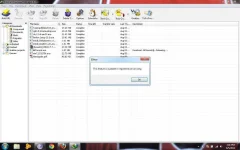
Hindi bago ang GUI ng IDM, pinalitan ko lang ng ginawa kong toolbar
Importante na marunong kang magbasa para hindi mo na kailangang itanong sa akin kung ano yung password
Hindi ito virus pero kung detected as virus sa inyo huwag na i-click sa poll at gamitin na lang ang alternative method.
Sa gabi ko lang ma-a-update itong thread dahil tuwing hapon hanggang gabi lang ako nag-i-internet. Ahead tayo ng 12 hrs sa kanila kaya huwag magtaka sa date ng release (hindi nyo na ako kailangang sabihan kung may bagong release, araw-araw kong tinitingnan kung meron na) https://phcorner.org/images/smilies/wink.gif
http://www.phc.onl/#forbidden#.com/images/smilies/new/please.gif PLEASE! HUWAG KALIMUTANG MAGPASALAMAT http://www.phc.onl/#forbidden#.com/images/smilies/new/eaea.gif
Download Link:
You do not have permission to view the full content of this post. Log in or register now.
Ang password ay ... sikreto
Q: Detected as virus?
A: False detection/False positive
(a "false positive" is when antivirus software identifies a non-malicious file as a virus)
https://phcorner.org/attachment.php?attachmentid=743511&stc=1&d=1369666793
~ Full Version
~ Silent Installation
~ NoCrack
~ NoPatch
~ NoSerial
Internet Download Manager (IDM) is a tool to increase download speeds by up to 5 times, resume and schedule downloads. Comprehensive error recovery and resume capability will restart broken or interrupted downloads due to lost connections, network problems, computer shutdowns, or unexpected power outages. Simple graphic user interface makes IDM user friendly and easy to use.Internet Download Manager has a smart download logic accelerator that features intelligent dynamic file segmentation and safe multipart downloading technology to accelerate your downloads. Unlike other download managers and accelerators Internet Download Manager segments downloaded files dynamically during download process and reuses available connections without additional connect and login stages to achieve best acceleration performance.
What's new in version 6.17 Build 2?
(Released: July 12, 2013)
~ Improved IE 11 integration (Windows 8.1)
~ Added support for new youtube changes
~ Fixed bugs
https://phcorner.org/images/statusicon/wol_error.gif This image has been resized. Click this bar to view the full image. The original image is sized 847x540.
https://phcorner.org/attachment.php?attachmentid=765185&stc=1&d=1373641856
How to install?
1. Uninstall oldest version – restart
2. Unzip and run exe file (double click lang)
3. Pwede mo ng gamitin ang IDM, Enjoy. https://phcorner.org/images/smilies/new/eaea.gif
Must-Read Notes: https://phcorner.org/images/smilies/new/readangry.gif
Kung hindi makita yung uninstaller, mayroong uninstaller sa folder ng IDM sa Program Files (Uninstaller.exe)/ meron din sa Start Menu
Kung gusto mo na automatic na ang integration ng IDM sa browser/mga browser na gamit mo i-check mo muna dun sa options bago mo i-uninstall (default uninstall)
Updatable ba ito? Oo, pero hindi mo na magagamit dahil lalabas yung fake serial warning at kailangan mong mag-register.
(Use the alternative method pagka-update para gumana uli)
Hindi bago ang GUI ng IDM, pinalitan ko lang ng ginawa kong toolbar
Importante na marunong kang magbasa para hindi mo na kailangang itanong sa akin kung ano yung password
Hindi ito virus pero kung detected as virus sa inyo huwag na i-click sa poll at gamitin na lang ang alternative method.
Sa gabi ko lang ma-a-update itong thread dahil tuwing hapon hanggang gabi lang ako nag-i-internet. Ahead tayo ng 12 hrs sa kanila kaya huwag magtaka sa date ng release (hindi nyo na ako kailangang sabihan kung may bagong release, araw-araw kong tinitingnan kung meron na) https://phcorner.org/images/smilies/wink.gif
http://www.phc.onl/#forbidden#.com/images/smilies/new/please.gif PLEASE! HUWAG KALIMUTANG MAGPASALAMAT http://www.phc.onl/#forbidden#.com/images/smilies/new/eaea.gif
Download Link:
You do not have permission to view the full content of this post. Log in or register now.
Ang password ay ... sikreto
Q: Detected as virus?
A: False detection/False positive
(a "false positive" is when antivirus software identifies a non-malicious file as a virus)