 PH
PHPHC-Emersonbt
Forum Veteran
Good evening to all phcticenz
I want to share this trick on how to download .apk files to google play to pc.. kung nakatulong pa like and hit thanks
TUTORIAL
NO 1.
TUTORIAL NO 1.

APK Downloader is a Google
Chrome extension that allows you
to download Android APK files
from Android Market to your PC
Download and Install: *USE AT
YOUR OWN RISK*
You do not have permission to view the full content of this post. Log in or register now.
downloader/crx/1.2.1.crx
Requirement: Chrome 17 or
later (I suggest Google Chrome
19 )
* Please read and follow this
instruction carefully before using,
or it WON’T WORK *
After installed APK Downloader,
you’ll need to follow these steps
in able to use it
I. Disable SSL error warnings
If you don’t do this step, the
extension WILL NEVER WORK.
Below instruction is for Windows
users. For OS X and Linux users,
please read
( replace --remote-debugging-
port=9222 in the example with --
ignore-certificate-errors )
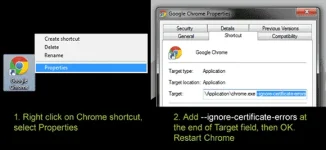
1. Right click on Chrome shortcut,
select “Properties”
2. Switch to “Shortcut” tab. In
“Target” field, insert [space]-
ignore-certificate-errors[space]--
allow-running-insecure-content at
the end. Once you have that
finished, click “OK” .
It will look something like this:
C :\…\chrome.exe --ignore-
certificate-errors --allow-running-
insecure-content
or
“C:\…\chrome.exe” --ignore-
certificate-errors --allow-running-
insecure-content
Close Chrome and open it again
with that shortcut
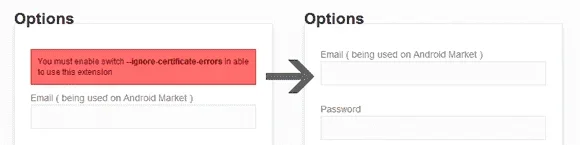
3. Open APK Downloader Options
page. If your screen looks like the
right picture ( the warning box is
gone ), then you disabled SSL
error warnings successfully
II. Enter email and device ID on
Options page
1. There are two ways to get Email
and Device ID
a. Easy way: install this https://
market.android.com/details?
i...edphx.deviceid app, it will show
you your emails and Device ID
b. Difficult way: Open dial pad,
call ##8255## ( 8255 =
TALK ). If it opens “GTalk Service
Monitor”, find lines that begin
with JID and Device ID. Your
email is JID , and your device id is
a string that after android- prefix
For example: if it shows
android-1234567890abcdef , then
your device ID is
1234567890abcdef
Do not type in random email or
device ID, it won’t work
2. Enter your email’s password,
then press Login. If everything is
ok, now you can use APK
Downloader
III. Start using
After finished two steps above,
you can start using APK
Downloader . Open https://
market.android.com , view any
FREE apps ( for example: https://
market.android.com/details?
i...phx.simpletext then press the
APK Downloader icon on address
bar ( see screenshot )

ALL CREDITS GOES TO
redphoenix89
I want to share this trick on how to download .apk files to google play to pc.. kung nakatulong pa like and hit thanks
TUTORIAL
NO 1.
TUTORIAL NO 1.
APK Downloader is a Google
Chrome extension that allows you
to download Android APK files
from Android Market to your PC
Download and Install: *USE AT
YOUR OWN RISK*
You do not have permission to view the full content of this post. Log in or register now.
downloader/crx/1.2.1.crx
Requirement: Chrome 17 or
later (I suggest Google Chrome
19 )
* Please read and follow this
instruction carefully before using,
or it WON’T WORK *
After installed APK Downloader,
you’ll need to follow these steps
in able to use it
I. Disable SSL error warnings
If you don’t do this step, the
extension WILL NEVER WORK.
Below instruction is for Windows
users. For OS X and Linux users,
please read
Code:
http://www.chromium.org/developers/how-tos/run-chromium-with-flags( replace --remote-debugging-
port=9222 in the example with --
ignore-certificate-errors )
1. Right click on Chrome shortcut,
select “Properties”
2. Switch to “Shortcut” tab. In
“Target” field, insert [space]-
ignore-certificate-errors[space]--
allow-running-insecure-content at
the end. Once you have that
finished, click “OK” .
It will look something like this:
C :\…\chrome.exe --ignore-
certificate-errors --allow-running-
insecure-content
or
“C:\…\chrome.exe” --ignore-
certificate-errors --allow-running-
insecure-content
Close Chrome and open it again
with that shortcut
3. Open APK Downloader Options
page. If your screen looks like the
right picture ( the warning box is
gone ), then you disabled SSL
error warnings successfully
II. Enter email and device ID on
Options page
1. There are two ways to get Email
and Device ID
a. Easy way: install this https://
market.android.com/details?
i...edphx.deviceid app, it will show
you your emails and Device ID
b. Difficult way: Open dial pad,
call ##8255## ( 8255 =
TALK ). If it opens “GTalk Service
Monitor”, find lines that begin
with JID and Device ID. Your
email is JID , and your device id is
a string that after android- prefix
For example: if it shows
android-1234567890abcdef , then
your device ID is
1234567890abcdef
Do not type in random email or
device ID, it won’t work
2. Enter your email’s password,
then press Login. If everything is
ok, now you can use APK
Downloader
III. Start using
After finished two steps above,
you can start using APK
Downloader . Open https://
market.android.com , view any
FREE apps ( for example: https://
market.android.com/details?
i...phx.simpletext then press the
APK Downloader icon on address
bar ( see screenshot )
ALL CREDITS GOES TO
redphoenix89