 PH
PH-
Welcome to PHCorner Forums! Sign up for free to unlock full access and exclusive privileges, including:
- Asking questions about computer and mobile issues
- Discovering internet tips for your mobile network and computer
You are using an out of date browser. It may not display this or other websites correctly.
You should upgrade or use an alternative browser.
You should upgrade or use an alternative browser.
🔒 Closed How to open vivo y53?
- Thread starter 121819
- Start date
- Status
- Not open for further replies.
YowDeeFutikz
Elite
- Start by holding down the Power key for a short while in order to switch off the device.
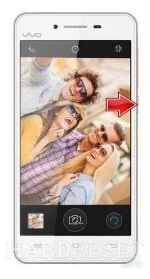
- After that, press and hold the Volume Up + Power button ftogether or a few seconds.
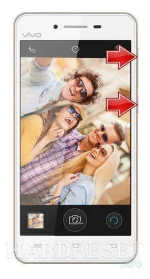
- Let go of the Power key as soon as the Vivo logo shows up on the screen.
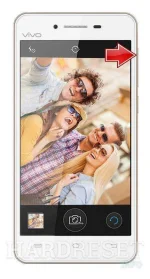
- You ought to kepp holding the Volume Up key until the Recovery Mode appears in front of you.
- In the next step use Volume buttons to select "Wipe data" and tap the Power button to confirm.
- Afterwards from the menu choose "Wipe data" one more time and accept it with Power button.
- As soon as the Recovery Mode appears again on the screen accept option "Reboot your device" using Power rocker.
- Excellent! The factory reset operation should be completed.
try mo muna to, shutdown mo muna phone mo then reboot to recovery
FreeAllYouCan-OFFICIAL
Grasshopper
try mo muna to, shutdown mo muna phone mo then reboot to recovery
- Start by holding down the Power key for a short while in order to switch off the device.
- After that, press and hold the Volume Up + Power button ftogether or a few seconds.
- Let go of the Power key as soon as the Vivo logo shows up on the screen.
- You ought to kepp holding the Volume Up key until the Recovery Mode appears in front of you.
- In the next step use Volume buttons to select "Wipe data" and tap the Power button to confirm.
- Afterwards from the menu choose "Wipe data" one more time and accept it with Power button.
- As soon as the Recovery Mode appears again on the screen accept option "Reboot your device" using Power rocker.
- Excellent! The factory reset operation should be completed.
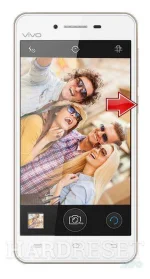
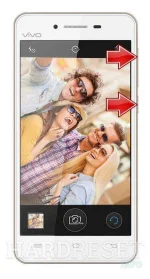
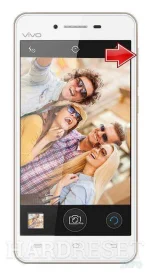
kapag pinindot wipe data nagaask nga ng password sir.
celltronix
Eternal Poster
hanap po kau rb soft 1.6 crack.. dun mo e format user data via edl cable.. hindi kasi yan matanggal sa wipe data..
kung hihinge sya tulong sayo, kahit guide, malaking bagay yon..hanap po kau rb soft 1.6 *****.. dun mo e format user data via edl cable.. hindi kasi yan matanggal sa wipe data..
celltronix
Eternal Poster
yung site na lang po master, lahat andiyan na, driver tut at firmware..kung hihinge sya tulong sayo, kahit guide, malaking bagay yon..
dito po You do not have permission to view the full content of this post. Log in or register now.
- Status
- Not open for further replies.
Similar threads
About this Thread
-
6Replies
-
2KViews
-
6Participants
Last reply from:
celltronix
celltronix
New Topics
-
Looking for Chimera tool rent
- Started by Deviroche
- Replies: 0
- ❓ Mobile Discussion & Support
-
Loktv or loklok mod
- Started by Junvy Jarales
- Replies: 0
- ❓ Mobile Discussion & Support
-
Pa help po sa Vivo 29e frp pls
- Started by sl4yer1000
- Replies: 0
- ❓ Mobile Discussion & Support
-
Lcd Samsung galaxy flip 4 repair cost
- Started by AmehGoOoO
- Replies: 0
- ❓ Mobile Discussion & Support
-
Rog 9 pro issue
- Started by HitSoHard
- Replies: 0
- ❓ Mobile Discussion & Support
-
Help for infinix smart 8 X6525
- Started by The BGE
- Replies: 0
- ❓ Mobile Discussion & Support
-
Fairphone in PH?
- Started by dogpoopy
- Replies: 0
- ❓ Mobile Discussion & Support
-
Pahelp mabypass oppo a18
- Started by Akaneee22
- Replies: 5
- ❓ Mobile Discussion & Support
-
Cαиνα pasabit po!
- Started by saiiirus16
- Replies: 0
- ❓ Mobile Discussion & Support
-
Pasabit naman Cánvá ρrø Salamat
- Started by Dontreachyoungbloood
- Replies: 1
- ❓ Mobile Discussion & Support
Trending Topics
Online now
- Members online
- 351
- Guests online
- 7,050
- Total visitors
- 7,401