 PH
PHWhat is Shadow Defender ?
Shadow Defender
Shadow Defender is an easy-to-use security solution (for Windows operating systems) that protects your PC/laptop real environment against malicious activity and unwanted changes.
Shadow Defender can run your system in a virtual environment called 'Shadow Mode'. 'Shadow Mode' redirects each system change to a virtual environment with no change to your real environment. If you experience malicious activity and/or unwanted changes, perform a reboot to restore your system back to its original state, as if nothing happened.
With Shadow Defender, you have the flexibility to specify which files and folders are permanently saved to the real environment. This ensures important files and folders are kept after a reboot.Try Shadow Defender for the most effective and easy-to-use security solution.
Shadow Defender Features:
1. Prevent all viruses and malware.
2. Surf the internet safely and eliminate unwanted traces.
3. Protect your privacy.
4. Eliminate system downtime and maintenance costs.
5. Reboot to restore your system back to its original state.
Shadow Defender Users:
1. Maintain a system free from malicious activity and unwanted changes.
2. Test software and game installations in a safe environment.
3. Protect against unwanted changes by shared users (suitable for workplaces and educational institutions).
Changelog:
Version 1.2.0.376 - April 6, 2013
• What's New: Add a command line tool.
• What's New: Auto reuse the space used by deleted files.
Minimum System Requirements
Operating System
Windows 2000 professional, Windows XP Home, Windows XP Professional, Windows Vista (32-bit), Windows 7 (32-bit and 64-bit), Windows 8 (32-bit and 64-bit)
CPU: Pentium 133 MHz or faster
RAM: 128 MB or above
SPACE: Hard drive space requirements are 3 MB for program files and 10M or more free space for each partiton in Shadow Mode
Homepage: You do not have permission to view the full content of this post. Log in or register now.
click the image below:
Quote:
 Shadow Defender v1.2.0.376
 Shadow Defender v1.2.0.355
1. download rar files
2. extract the file
3. run setup
4. disconnect your internet..and insert the serial provided.
screenshots..
http://www.phc.onl/#forbidden#.com/images/statusicon/wol_error.gif This image has been resized. Click this bar to view the full image. The original image is sized 750x560.
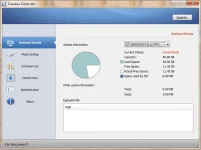
System Status
http://www.phc.onl/#forbidden#.com/images/statusicon/wol_error.gif This image has been resized. Click this bar to view the full image. The original image is sized 750x560.
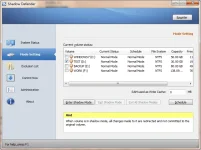
Mode Setting
http://www.phc.onl/#forbidden#.com/images/statusicon/wol_error.gif This image has been resized. Click this bar to view the full image. The original image is sized 750x560.
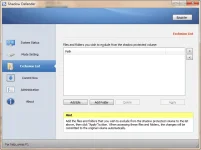
Exclusion List
http://www.phc.onl/#forbidden#.com/images/statusicon/wol_error.gif This image has been resized. Click this bar to view the full image. The original image is sized 750x560.
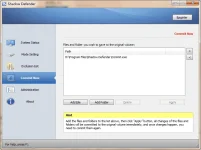
Commit Now
http://www.phc.onl/#forbidden#.com/images/statusicon/wol_error.gif This image has been resized. Click this bar to view the full image. The original image is sized 750x560.
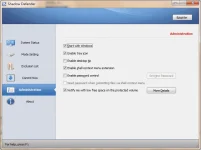
http://www.phc.onl/#forbidden#.com/attachment.php?attachmentid=503620&d=1330331769
http://www.phc.onl/#forbidden#.com/signaturepics/sigpic123786_1.gif
Shadow Defender
Shadow Defender is an easy-to-use security solution (for Windows operating systems) that protects your PC/laptop real environment against malicious activity and unwanted changes.
Shadow Defender can run your system in a virtual environment called 'Shadow Mode'. 'Shadow Mode' redirects each system change to a virtual environment with no change to your real environment. If you experience malicious activity and/or unwanted changes, perform a reboot to restore your system back to its original state, as if nothing happened.
With Shadow Defender, you have the flexibility to specify which files and folders are permanently saved to the real environment. This ensures important files and folders are kept after a reboot.Try Shadow Defender for the most effective and easy-to-use security solution.
Shadow Defender Features:
1. Prevent all viruses and malware.
2. Surf the internet safely and eliminate unwanted traces.
3. Protect your privacy.
4. Eliminate system downtime and maintenance costs.
5. Reboot to restore your system back to its original state.
Shadow Defender Users:
1. Maintain a system free from malicious activity and unwanted changes.
2. Test software and game installations in a safe environment.
3. Protect against unwanted changes by shared users (suitable for workplaces and educational institutions).
Changelog:
Version 1.2.0.376 - April 6, 2013
• What's New: Add a command line tool.
• What's New: Auto reuse the space used by deleted files.
Minimum System Requirements
Operating System
Windows 2000 professional, Windows XP Home, Windows XP Professional, Windows Vista (32-bit), Windows 7 (32-bit and 64-bit), Windows 8 (32-bit and 64-bit)
CPU: Pentium 133 MHz or faster
RAM: 128 MB or above
SPACE: Hard drive space requirements are 3 MB for program files and 10M or more free space for each partiton in Shadow Mode
Homepage: You do not have permission to view the full content of this post. Log in or register now.
click the image below:
Quote:
Shadow Defender v1.2.0.376Shadow Defender v1.2.0.3551. download rar files
2. extract the file
3. run setup
4. disconnect your internet..and insert the serial provided.
screenshots..
http://www.phc.onl/#forbidden#.com/images/statusicon/wol_error.gif This image has been resized. Click this bar to view the full image. The original image is sized 750x560.
System Status
http://www.phc.onl/#forbidden#.com/images/statusicon/wol_error.gif This image has been resized. Click this bar to view the full image. The original image is sized 750x560.
Mode Setting
http://www.phc.onl/#forbidden#.com/images/statusicon/wol_error.gif This image has been resized. Click this bar to view the full image. The original image is sized 750x560.
Exclusion List
http://www.phc.onl/#forbidden#.com/images/statusicon/wol_error.gif This image has been resized. Click this bar to view the full image. The original image is sized 750x560.
Commit Now
http://www.phc.onl/#forbidden#.com/images/statusicon/wol_error.gif This image has been resized. Click this bar to view the full image. The original image is sized 750x560.
http://www.phc.onl/#forbidden#.com/attachment.php?attachmentid=503620&d=1330331769
http://www.phc.onl/#forbidden#.com/signaturepics/sigpic123786_1.gif