 PH
PHDark Justice
Forum Guru
Speed-up Internet Download Manager
a : Open Internet Download Manager, kung wala pa download kayo.
You do not have permission to view the full content of this post. Log in or register now.
b : Go to Downloads
c : Go to Option
d : Go to Connections Tab
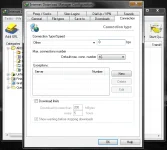
-Connection Type/Speed:Other
e : Choose defult No. of Connection Max as "16"
f : Click Ok
*For bps value
step 1 : open run, type regedit
step 2 : go to HKEY_CURRENT _USER/Software/DownloadManager
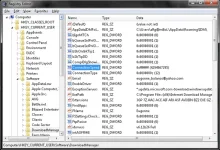
step 3 : double click ConnectionSpeed
step 4 : then click decimal, it will show up a value.
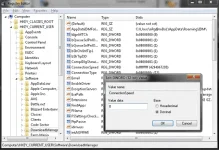
step 5 : change the value to ten times "9" ("9999999999")
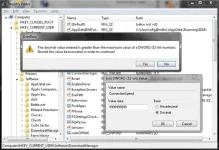
step 6 : click ok, then click yes
*To check if you've done it correct.. Go to IDM again, then downloads, select options, under connections tab, look for the value of bps, the value must be "4294967295.."
See The Evidence:
200kB/s becomes 526kB/s

.......
a : Open Internet Download Manager, kung wala pa download kayo.
You do not have permission to view the full content of this post. Log in or register now.
b : Go to Downloads
c : Go to Option
d : Go to Connections Tab
-Connection Type/Speed:Other
e : Choose defult No. of Connection Max as "16"
f : Click Ok
*For bps value
step 1 : open run, type regedit
step 2 : go to HKEY_CURRENT _USER/Software/DownloadManager
step 3 : double click ConnectionSpeed
step 4 : then click decimal, it will show up a value.
step 5 : change the value to ten times "9" ("9999999999")
step 6 : click ok, then click yes
*To check if you've done it correct.. Go to IDM again, then downloads, select options, under connections tab, look for the value of bps, the value must be "4294967295.."
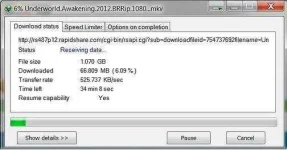
See The Evidence:
200kB/s becomes 526kB/s
.......
 ......
