 PH
PH
Supercharge your Windows experience
Revolutionize your operating system with You do not have permission to view the full content of this post. Log in or register now.. Utilize an unprecedented number of special effects for your windows and maximize your computing experience.
The main function of WindowFX are:
· Control your windows with custom resizing
· Modify your windows animation and movement
· Regain focus of what is really important
Due to this application, you will be able to add a wide range of special effects to windows, such as:
· True, alpha blended shadows under windows
· A set of minimize and maximize transition effects
· A set of window dragging effects
· A set of window opening and closing animations
· Graphical task switching
· Taskbar previews
· Window tiles
· Popup task switching
· Ability to have large icons on the desktop while having normal sized icons everywhere else
· Wide range of semi-transparency options such as making windows, the start bar, menus, and more semi-transparent
· Various special effects for Windows desktop icons and their labels
· A set of special effects for menus when opened and closed
· User defined size for windows to maximize to.
Supported OS: Windows 7 / Vista / XP (32-bit only on XP)
See it in action:
You do not have permission to view the full content of this post. Log in or register now.
Installation:
Quote:
1.) Install "WindowFX5.1_setup.exe".
2.) Copy "Keymaker&ρá†ch.exe" file to installation folder (ProgramFiles/Stardock/Object Desktop/Window FX).
3.) Run "keygen&ρá†ch.exe" as Administrator;
Choose "WindowFX v5.1",
click "SAVE LICENSE",
click "ρá†ch".
DONE!
click "SAVE LICENSE",
click "ρá†ch".
DONE!
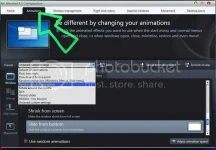
How to Apply Animations:
http://www.phc.onl/#forbidden#.com/images/statusicon/wol_error.gif This image has been resized. Click this bar to view the full image. The original image is sized 892x622.
Quote:
1.) Click "Animations" tab.
2.) Choose a preset from the drop-down list.
---- ---- ---- ---- ---- ---- ---- ---- ---- ---- ---- ---- ---- ---- ---- ---- ---- ---- ---- ---- ---- ---- ---- ---- ---- ---- ----
PARA SA XP USERS NA MAY PROBLEMA SA v5.1:
Quote:
(Quoting Stardock's site & forum members' comments)
"Over 30 animated effects for window actions (Windows 7 required for MOST effects)."
"WindowFX 5 on Windows XP is very similar in feature set to WindowFX 4 on Windows XP. There are no animations at all on that OS. For animations you would need to use WindowFX 3 on XP."
"In short if WindowFX4 wasn't exciting for you on Windows XP then I would imagine WindowFX 5 will also be disappointing on Windows XP. The bulk of the new things are Windows 7 only."
May nag-confirm kasi dito na gumagana nga ito sa XP pero SELECTED animations lang ang pwede. Kaya ilalagay ko na rin dito yung v3.0 para sa XP userskung hindi satisfied sa v5.1. (Itong v3.0 ang gamit ko nung naka-XP pa'ko, kaya dapat gumana rin ito sa inyo. hehe)
DOWNLOAD LINKS (Mediafire)
You do not have permission to view the full content of this post. Log in or register now.
You do not have permission to view the full content of this post. Log in or register now.
Mag-iwan po sana kayo ng feedback para mabasa rin ng iba. (OS nyo at kung working ba/hindi.)
