PH
PHDynamicPro
Fanatic
Hello ka mga ka phc, i have discovered a trick para po makapag downoad ng mega files to idm directly.
paki delete nlang po if posted na po ito.
Para po ito sa lahat ng di pa nakakaalam nito.
Credits sa naka discover nito, repost ko nlang po.
How to Download Mega File Using IDM?
Mega is a cloud storage and file hosting service offered by Mega Limited, a New Zealand-based company. The service is offered primarily through web-based apps. Mega mobile apps are also available for Windows Phone, Android and iOS.
To Simply Download Mega Files to IDM, things you needed:
>You do not have permission to view the full content of this post. Log in or register now.
>You do not have permission to view the full content of this post. Log in or register now.
First install niyo po muna IDM, after that yung MegaSync Desktop Client, pagkatapos ma install ng dalawa, ready na po for downloading....
Hanap po kayo ng file na gusto niyong i download sa Mega.nz, sample You do not have permission to view the full content of this post. Log in or register now..
>copy the link
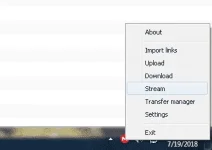
>in the notification bar/area(lower right sa desktop niyo) hanapin niyo MEGASync icon.
>right click niyo po yun, then click stream
>on the next window choose Public Link
>enter niyo po yung link na galing sa mega.nz, yung link ng gusto niyong idownload
>click ok
>then click on the link icon next to file name to copy URL to clipboard
>do not close the Mega App and open IDM.
>click niyo po yung Add URL sa IDM, then paste the link to download the file.
>keep it downloading
>make sure not to close the browser window and the Mega App until you stream the app.
>and so on and so forth....
Screenshots below...
Hit thanks if nakatulong...
credits sa nakadiskubre...
paki delete nlang po if posted na po ito.
Para po ito sa lahat ng di pa nakakaalam nito.
Credits sa naka discover nito, repost ko nlang po.
How to Download Mega File Using IDM?
Mega is a cloud storage and file hosting service offered by Mega Limited, a New Zealand-based company. The service is offered primarily through web-based apps. Mega mobile apps are also available for Windows Phone, Android and iOS.
To Simply Download Mega Files to IDM, things you needed:
>You do not have permission to view the full content of this post. Log in or register now.
>You do not have permission to view the full content of this post. Log in or register now.
First install niyo po muna IDM, after that yung MegaSync Desktop Client, pagkatapos ma install ng dalawa, ready na po for downloading....
Hanap po kayo ng file na gusto niyong i download sa Mega.nz, sample You do not have permission to view the full content of this post. Log in or register now..
>copy the link
>in the notification bar/area(lower right sa desktop niyo) hanapin niyo MEGASync icon.
>right click niyo po yun, then click stream
>on the next window choose Public Link
>enter niyo po yung link na galing sa mega.nz, yung link ng gusto niyong idownload
>click ok
>then click on the link icon next to file name to copy URL to clipboard
>do not close the Mega App and open IDM.
>click niyo po yung Add URL sa IDM, then paste the link to download the file.
>keep it downloading
>make sure not to close the browser window and the Mega App until you stream the app.
>and so on and so forth....
Screenshots below...
Hit thanks if nakatulong...
credits sa nakadiskubre...