 PH
PHedj vincent
Forum Veteran
hi guys am here nasad, btaw share ko lang sana how to user SOFTETHER.
sa mga nag tatanung dyan kaway nmn dyan O
paki sundan nalag mga baguhan sa free net.
How to use SoftEther on Windows
Now we will connect VPN by using SoftEther. We just need 2 things, that is,
1.SoftEther Client You do not have permission to view the full content of this post. Log in or register now.
2.SoftEther Account, you can get it free from You do not have permission to view the full content of this post. Log in or register now. If You don’t have it yet, You can go t You do not have permission to view the full content of this post. Log in or register now.
Now we go to first step
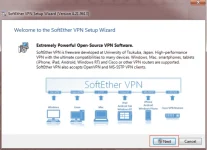
1. Install SoftEther Client. Double click SoftEther Client installation file. Then click Next.
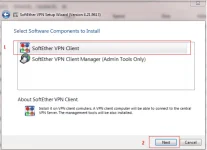
2.Choose SoftEther VPN Client then click Next until finish
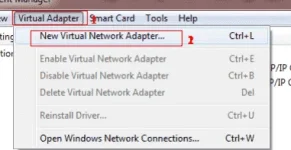
3. Create Virtual Network Adapter. Click on Virtual Adapter, then click New Virtual Network Adapter
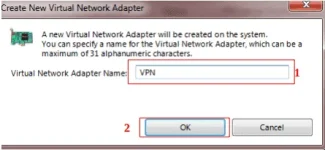
4. Fill Virtual Network Adapter Name form freely, then click OK
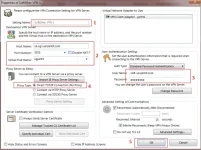
6. Fill Setting Name from freely, then fill Host Name, Port Number, Virtual Hub Name, User Name and Password, same with VPN SoftEther account which has been created before. After that, on Proxy Type choose Direct TCP/IP… and click OK
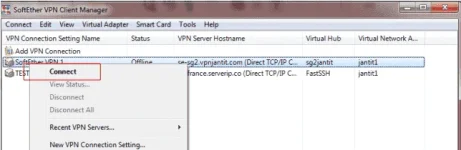
7. Next, Right Click VPN Profile which created before, then choose Connect
Success, it will look like this picture below
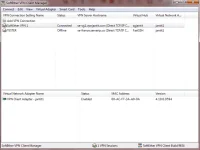
7. Congratuliaton!!!You have successfully using VPN with SoftEther (Server location in Singapore)
https://phc.onl/#forbidden#/attachments/upload_2018-7-12_2-19-38-png.107620/OFFS DONT FORGET LIKE
AND DONT HET AND RUN
sa mga nag tatanung dyan kaway nmn dyan O
paki sundan nalag mga baguhan sa free net.
How to use SoftEther on Windows
Now we will connect VPN by using SoftEther. We just need 2 things, that is,
1.SoftEther Client You do not have permission to view the full content of this post. Log in or register now.
2.SoftEther Account, you can get it free from You do not have permission to view the full content of this post. Log in or register now. If You don’t have it yet, You can go t You do not have permission to view the full content of this post. Log in or register now.
Now we go to first step
1. Install SoftEther Client. Double click SoftEther Client installation file. Then click Next.
2.Choose SoftEther VPN Client then click Next until finish
3. Create Virtual Network Adapter. Click on Virtual Adapter, then click New Virtual Network Adapter
4. Fill Virtual Network Adapter Name form freely, then click OK
6. Fill Setting Name from freely, then fill Host Name, Port Number, Virtual Hub Name, User Name and Password, same with VPN SoftEther account which has been created before. After that, on Proxy Type choose Direct TCP/IP… and click OK
7. Next, Right Click VPN Profile which created before, then choose Connect
Success, it will look like this picture below
7. Congratuliaton!!!You have successfully using VPN with SoftEther (Server location in Singapore)
https://phc.onl/#forbidden#/attachments/upload_2018-7-12_2-19-38-png.107620/OFFS DONT FORGET LIKE
AND DONT HET AND RUN
