 PH
PHInpaint 5.2 Portable
https://images-blogger-opensocial.googleusercontent.com/gadgets/proxy?url=http%3A%2F%2Fimg194.imageshäçk.us%2Fimg194%2F3702%2F88279773.jpg&container=blogger&gadget=a&rewriteMime=image%2F*
Inpaint 5.2 Portable is a portable software that can help us to remove an unwanted object in an image or photo, such as logo, watermark, people, text, etc.. This program can you take it wherever you go with the flash and when used will automatically be Inpaint selected area to erase it.
Use Inpaint 5.2 Portable very simple it does not require special skills, but the results are very impressive. You can get rid of something you do not want just a few clicks. If some unexpected object of beauty *******e a photo, Inpaint 5.2 Portable can be used to remove it. Simply select the object you want to be removed, and your photo will be saved.
When you run the program for the first time, the program would be speaking Russian. If you want to change the language, please see the picture below.
https://images-blogger-opensocial.googleusercontent.com/gadgets/proxy?url=http%3A%2F%2Fimg580.imageshäçk.us%2Fimg580%2F5038%2F60421012.jpg&container=blogger&gadget=a&rewriteMime=image%2F*
https://images-blogger-opensocial.googleusercontent.com/gadgets/proxy?url=http%3A%2F%2Fimg826.imageshäçk.us%2Fimg826%2F5554%2F31133307.jpg&container=blogger&gadget=a&rewriteMime=image%2F*
https://images-blogger-opensocial.googleusercontent.com/gadgets/proxy?url=http%3A%2F%2Fimg543.imageshäçk.us%2Fimg543%2F497%2F67385948.jpg&container=blogger&gadget=a&rewriteMime=image%2F*
https://images-blogger-opensocial.googleusercontent.com/gadgets/proxy?url=http%3A%2F%2Fimg713.imageshäçk.us%2Fimg713%2F4392%2F52421565.jpg&container=blogger&gadget=a&rewriteMime=image%2F*
After that please close the program, then run back and your program will use the language that you selected earlier.
Tutorials
Easy way to fix your photos
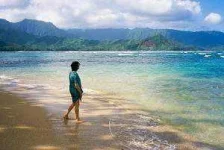 1.Load the image
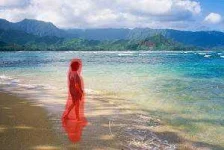 2.Select the problem area to be corrected
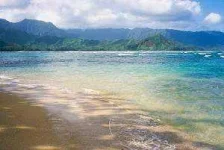 3.Say goodbye to the unwanted objects and save
Photo retouch and restoration tips:
You do not have permission to view the full content of this post. Log in or register now. This tutorial tells how to use Inpaint - easy to use photo repair software.
You do not have permission to view the full content of this post. Log in or register now. Everyone has at least one: the perfect photo, if it wasn't for that person walking by just as you took the picture. Removing unwanted people from your photos literally couldn't be quicker and simpler. Watch the photograph repaired in front of your eyes.
You do not have permission to view the full content of this post. Log in or register now. Inpaint can get rid of pesky tourists or other distractions from your beautiful vacation shot, by seamlessly blending two or more pictures of the same scene.
You do not have permission to view the full content of this post. Log in or register now. Inpaint does an incredible job of removing unwanted elements from your photos, but you can sometimes make the process that little bit more accurate by the use of Guide Lines.
You do not have permission to view the full content of this post. Log in or register now. Photo restoration is about more than merely cropping out unwanted elements. Inpaint's "donor" area selection allows you to specify exactly what you want to replace the deleted area with.
You do not have permission to view the full content of this post. Log in or register now. If you're visiting a hugely popular tourist area during your vacation, you can't stand there all day and wait for the perfect photo. With Inpaint there's no need - just take several pictures and allow Inpaint to clean it up and make your photos perfect!
You do not have permission to view the full content of this post. Log in or register now. Merging photos into a panorama often leads to unsightly empty areas on the final stitched image. Inpaint momentarily restores those black areas saving the natural non-cropped look of the photo and retaining author's composition.
You do not have permission to view the full content of this post. Log in or register now. This tutorial tells how to remove a watermark from a photo in several minutes without any graphic or retouching skills at all.
You do not have permission to view the full content of this post. Log in or register now. Have you ever thought: "This photo is superb expect for these power lines on the background messing up all the effect"? Now you can quickly erase power lines from any photo with Inpaint.
You do not have permission to view the full content of this post. Log in or register now. Multiplicity Photography is a process of taking several photos of the same human, animal or object doing different things in different areas of the frame. All those photos are then combined using Inpaint.
You do not have permission to view the full content of this post. Log in or register now. You might find your camera's date stamp feature useful, at least until you decide to print some of your photographs. Photo retouch techniques in Photoshop are incredibly complex, but with Inpaint you can remove your date stamp in literally seconds.
You do not have permission to view the full content of this post. Log in or register now. Repairing an old family photo is easier than ever thanks to this simple Inpaint tool.
You do not have permission to view the full content of this post. Log in or register now. Discover how to easily remove people’s wrinkles and take years off without any graphic editor skills.
You do not have permission to view the full content of this post. Log in or register now. Watch how a palm tree is removed from a photograph in less than sixty seconds. Most people have no idea that photo retouching and restoration could be so quick and simple.
You do not have permission to view the full content of this post. Log in or register now.
https://images-blogger-opensocial.googleusercontent.com/gadgets/proxy?url=http%3A%2F%2Fimg194.imageshäçk.us%2Fimg194%2F3702%2F88279773.jpg&container=blogger&gadget=a&rewriteMime=image%2F*
Inpaint 5.2 Portable is a portable software that can help us to remove an unwanted object in an image or photo, such as logo, watermark, people, text, etc.. This program can you take it wherever you go with the flash and when used will automatically be Inpaint selected area to erase it.
Use Inpaint 5.2 Portable very simple it does not require special skills, but the results are very impressive. You can get rid of something you do not want just a few clicks. If some unexpected object of beauty *******e a photo, Inpaint 5.2 Portable can be used to remove it. Simply select the object you want to be removed, and your photo will be saved.
When you run the program for the first time, the program would be speaking Russian. If you want to change the language, please see the picture below.
https://images-blogger-opensocial.googleusercontent.com/gadgets/proxy?url=http%3A%2F%2Fimg580.imageshäçk.us%2Fimg580%2F5038%2F60421012.jpg&container=blogger&gadget=a&rewriteMime=image%2F*
https://images-blogger-opensocial.googleusercontent.com/gadgets/proxy?url=http%3A%2F%2Fimg826.imageshäçk.us%2Fimg826%2F5554%2F31133307.jpg&container=blogger&gadget=a&rewriteMime=image%2F*
https://images-blogger-opensocial.googleusercontent.com/gadgets/proxy?url=http%3A%2F%2Fimg543.imageshäçk.us%2Fimg543%2F497%2F67385948.jpg&container=blogger&gadget=a&rewriteMime=image%2F*
https://images-blogger-opensocial.googleusercontent.com/gadgets/proxy?url=http%3A%2F%2Fimg713.imageshäçk.us%2Fimg713%2F4392%2F52421565.jpg&container=blogger&gadget=a&rewriteMime=image%2F*
After that please close the program, then run back and your program will use the language that you selected earlier.
Tutorials
Easy way to fix your photos
1.Load the image 2.Select the problem area to be corrected 3.Say goodbye to the unwanted objects and savePhoto retouch and restoration tips:
- Rather than trying to remove all objects at once, try selecting and applying the Smart Remove Selection button to each one separately, one after another.
- Each Inpaint procedure is unique so you'll get a slightly different result each time you apply the Smart Remove Selection button.
You do not have permission to view the full content of this post. Log in or register now. This tutorial tells how to use Inpaint - easy to use photo repair software.
You do not have permission to view the full content of this post. Log in or register now. Everyone has at least one: the perfect photo, if it wasn't for that person walking by just as you took the picture. Removing unwanted people from your photos literally couldn't be quicker and simpler. Watch the photograph repaired in front of your eyes.
You do not have permission to view the full content of this post. Log in or register now. Inpaint can get rid of pesky tourists or other distractions from your beautiful vacation shot, by seamlessly blending two or more pictures of the same scene.
You do not have permission to view the full content of this post. Log in or register now. Inpaint does an incredible job of removing unwanted elements from your photos, but you can sometimes make the process that little bit more accurate by the use of Guide Lines.
You do not have permission to view the full content of this post. Log in or register now. Photo restoration is about more than merely cropping out unwanted elements. Inpaint's "donor" area selection allows you to specify exactly what you want to replace the deleted area with.
You do not have permission to view the full content of this post. Log in or register now. If you're visiting a hugely popular tourist area during your vacation, you can't stand there all day and wait for the perfect photo. With Inpaint there's no need - just take several pictures and allow Inpaint to clean it up and make your photos perfect!
You do not have permission to view the full content of this post. Log in or register now. Merging photos into a panorama often leads to unsightly empty areas on the final stitched image. Inpaint momentarily restores those black areas saving the natural non-cropped look of the photo and retaining author's composition.
You do not have permission to view the full content of this post. Log in or register now. This tutorial tells how to remove a watermark from a photo in several minutes without any graphic or retouching skills at all.
You do not have permission to view the full content of this post. Log in or register now. Have you ever thought: "This photo is superb expect for these power lines on the background messing up all the effect"? Now you can quickly erase power lines from any photo with Inpaint.
You do not have permission to view the full content of this post. Log in or register now. Multiplicity Photography is a process of taking several photos of the same human, animal or object doing different things in different areas of the frame. All those photos are then combined using Inpaint.
You do not have permission to view the full content of this post. Log in or register now. You might find your camera's date stamp feature useful, at least until you decide to print some of your photographs. Photo retouch techniques in Photoshop are incredibly complex, but with Inpaint you can remove your date stamp in literally seconds.
You do not have permission to view the full content of this post. Log in or register now. Repairing an old family photo is easier than ever thanks to this simple Inpaint tool.
You do not have permission to view the full content of this post. Log in or register now. Discover how to easily remove people’s wrinkles and take years off without any graphic editor skills.
You do not have permission to view the full content of this post. Log in or register now. Watch how a palm tree is removed from a photograph in less than sixty seconds. Most people have no idea that photo retouching and restoration could be so quick and simple.
You do not have permission to view the full content of this post. Log in or register now.
 patryyyyyyyyyyy