 PH
PHUsing Themes available in Windows Blind
This article is about how to install skins for Windows XP using Windows Blind. You can do it on vista and win7 also, but I will be using Win XP as an example in this post.
Usually people download and install *.theme files. But, in this post let’s see how to use .WBA files. To install these files we need a software called Windows Blind. You do not have permission to view the full content of this post. Log in or register now.
Using Themes available in Windows Blind
1. Download and install Windows Blind.
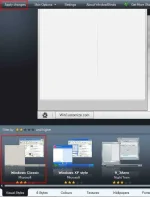
2. Open Windows blind, now you can see various skins in Windows Blinds you can select anyone from the list and click Apply Skin.
Downloading Skins and using
1. You can also download more WBA Skins at You do not have permission to view the full content of this post. Log in or register now.
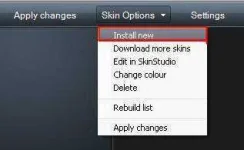
2. Now Open Windows Blind and click on “Skin Options” –> Install New and browse the downloaded theme file (*WBA) and select Ok, Now the new theme will be added to list at bottom of the window, you can select it and click on Apply Skin.
You have other options like Styles, Colours, textures, wallpaper, fonts etc. Don’t forget to play with these options.
This article is about how to install skins for Windows XP using Windows Blind. You can do it on vista and win7 also, but I will be using Win XP as an example in this post.
Usually people download and install *.theme files. But, in this post let’s see how to use .WBA files. To install these files we need a software called Windows Blind. You do not have permission to view the full content of this post. Log in or register now.
Using Themes available in Windows Blind
1. Download and install Windows Blind.
2. Open Windows blind, now you can see various skins in Windows Blinds you can select anyone from the list and click Apply Skin.
Downloading Skins and using
1. You can also download more WBA Skins at You do not have permission to view the full content of this post. Log in or register now.
2. Now Open Windows Blind and click on “Skin Options” –> Install New and browse the downloaded theme file (*WBA) and select Ok, Now the new theme will be added to list at bottom of the window, you can select it and click on Apply Skin.
You have other options like Styles, Colours, textures, wallpaper, fonts etc. Don’t forget to play with these options.
