PH
PHEyes Cream
Forum Guru
Hello guys ang dami ko kasi nakikita dito na mga nagtatanong kung papaano mai-connect yung CP nya sa LAPTOP nya for internet purpose XD
WINDOWS 10 gamit kong OS wag naman sana magalit kung di gumana sa ibang OS.
Simple lang yan
STEP-1:
Go to cmd (RUN AS ADMINISTRATOR) and type the following:
1st - netsh wlan set hostednetwork mode=allow ssid=(ANY) key=(YOUR DESIRED PASS)
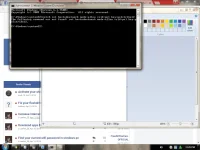
2nd - netsh wlan start hostednetwork

kapag nag apper nayan BOOM!
STEP-2:
Open "Run" then type ncpa.cpl

If you are using SOFTETHER or other VPN connection just, find this and go to properties

If you're "NOT" using SOFTETHER and you're using legitimate connection, find this and hit properties.

Then go to sharing and select these two

And now you're all set!
LAST STEP:
On your phone open your wifi and connect to your hotspot.
ENJOY!
WINDOWS 10 gamit kong OS wag naman sana magalit kung di gumana sa ibang OS.
Simple lang yan
STEP-1:
Go to cmd (RUN AS ADMINISTRATOR) and type the following:
1st - netsh wlan set hostednetwork mode=allow ssid=(ANY) key=(YOUR DESIRED PASS)
2nd - netsh wlan start hostednetwork
kapag nag apper nayan BOOM!
STEP-2:
Open "Run" then type ncpa.cpl
If you are using SOFTETHER or other VPN connection just, find this and go to properties
If you're "NOT" using SOFTETHER and you're using legitimate connection, find this and hit properties.
Then go to sharing and select these two
And now you're all set!
LAST STEP:
On your phone open your wifi and connect to your hotspot.
ENJOY!