🔒 Closed Nvidia error 3

Status
Not open for further replies.

AthrunZ

Grasshopper
I get error 3 on my NVIDIA Video Card.

The NVIDIA OpenGL driver detected a problem with the display driver and is unable to continue.

The application must closeError code:

Would you like to visitYou do not have permission to view the full content of this post. Log in or register now.for help?

I have tried the following:

Re install Driver
Rollback Driver
Tried This too:

1. Open your NVIDIA Control Panel and select “Manage 3D settings”
2. Then, select the “Power Management mode” and change the option from “Adaptive” to “Prefer maximum performance”
3. Save your changes, and your are done!

I still have the error.
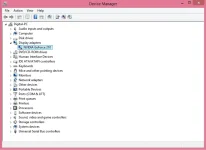
 
NVIDIA GeForce 210 sir.

nvdia.webp
 
Yeah. Had this PC for 4 years now. Even when it was new it had that quirk. I will try to get the original Driver and the Latest Driver. This method worked for a while:

1. Open your NVIDIA Control Panel and select “Manage 3D settings”
2. Then, select the “Power Management mode” and change the option from “Adaptive” to “Prefer maximum performance”
3. Save your changes, and your are done!

Then suddenly the error came back.
 
Yeah. Had this PC for 4 years now. Even when it was new it had that quirk. I will try to get the original Driver and the Latest Driver. This method worked for a while:

1. Open your NVIDIA Control Panel and select “Manage 3D settings”
2. Then, select the “Power Management mode” and change the option from “Adaptive” to “Prefer maximum performance”
3. Save your changes, and your are done!

Then suddenly the error came back.
subukan mo mag driverpack online
 
Status
Not open for further replies.

About this Thread

  • 7
    Replies
  • 511
    Views
  • 5
    Participants
Last reply from:
AthrunZ

Trending Topics

Online now

Members online
1,275
Guests online
1,235
Total visitors
2,510

Forum statistics

Threads
2,280,236
Posts
28,996,068
Members
1,226,662
Latest member
MJ08Mapagmahal
Back
Top