 PH
PHHOW TO: Change Facebook Relationship Status Without Noticing Friends?
Login to your Facebook account
Step 2
Go to your profile by clicking your name (located above right).
Step 3
Here you can see in the About Section of your Profile, click Edit.
Step 4
Step 5

Step 6

In older times, when we engage our relationship with the other half, we used phones or we personally broadcasts them with the latest news about our relationship to our love one. Time changes rapidly, in fact, in these days, we used Facebook to show to public that we are happily in relationship. That's good news then, however, there is a slight problem. What if we broke up? Sometimes, we tend not to change our Facebook relationship statuses and just hide instead for some valid reasons.
Now, how can we change our Facebook Relationship Status Without Noticing friends? Simple.
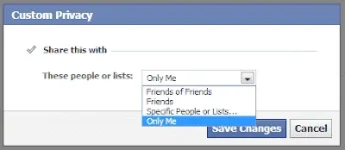
Setting up your relationship status is optional. You can config it NOT to show to public or you can choose who you want to see or hide to your Relationship Status.
Now, how can we change our Facebook Relationship Status Without Noticing friends? Simple.
Setting up your relationship status is optional. You can config it NOT to show to public or you can choose who you want to see or hide to your Relationship Status.
How to Change Facebook Relationship Status Without Noticing Friends
Step 1Login to your Facebook account
Step 2
Go to your profile by clicking your name (located above right).
Step 3
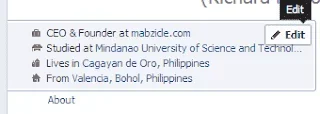
Here you can see in the About Section of your Profile, click Edit.
Step 4
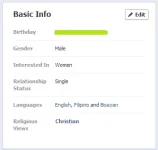
In the Basic Info, you will see bday, gender, Relationship status etc., you can click Edit hereStep 5
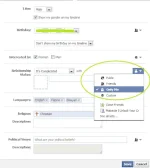
Now, you can choose Relationship Status, and SET it to ONLY ME. Or if you can want to see selected friends, then choose Custom. Step 6
When it done updating, you will be the one can view it.