PH
PHJussayFinnn
Forum Guru
Setting up your own VPN server
As Woz commented on my previous VPN article before the Senate debacle, you could be running your own VPN server:

But if you can’t trust your home connection or you have a slow upload speed on your home connection, it’s not really practical.
I played around with You do not have permission to view the full content of this post. Log in or register now., a set of scripts that let you set up a VPN in the cloud in very little time, even if you don’t know much about development. I’ve got to say that I was quite impressed with Trail of Bits’ approach.
I created VPN servers on a You do not have permission to view the full content of this post. Log in or register now.server, an Amazon Web Services instance and a You do not have permission to view the full content of this post. Log in or register now. server. I could connect to all these VPNs from my Mac and iPhone just a couple of minutes after that.
Algo VPN automates the VPN installation process so that you don’t have to establish an SSH connection with a server and run complicated command lines.
It takes three command lines to install the dependencies on your computer. After that, you should sign up to a cloud provider like DigitalOcean and run the Algo VPN setup wizard in your terminal. I’m not going to detail the installation process as it can change after I publish this post, but everything is explained on the official You do not have permission to view the full content of this post. Log in or register now..
On DigitalOcean, you don’t have to create and configure your own server. Algo VPN takes care of that for you as it uses DigitalOcean’s API to create a server and install everything.
At the end of the setup wizard, you’ll get a few files on your local hard drive. For instance, on macOS, double-clicking on the configuration profile will add the VPN server to your network settings and connect you to your VPN server. You don’t need to install a VPN client, it works natively on macOS and iOS.
So here’s a quick recap:
Running your own VPN server doesn’t mean that you’ll be more secure on the internet, either. Once again, you’re moving the risk down the tunnel to the cloud hosting provider.
If you use Algo VPN on a Microsoft Azure instance, the NSA could still ask Microsoft more information about you if they think you’re an evil person. Microsoft has your billing information.
But there’s something refreshing about Algo VPN — it lets you set up disposable VPNs. You can boot up a new VPN server and connect to this VPN in just a few minutes. Once you’re done, you can just delete your instance and pretend that this VPN server never existed.
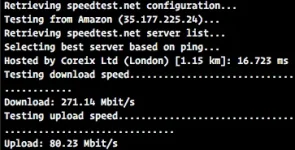
It’s much cheaper than subscribing to a VPN service, as you can expect to pay around $0.006 per hour of usage, or even less with free credit. And you’ll get much better performance as you won’t share your VPN server with other VPN users. I got amazing networking performances from my AWS VPN server for example:
While Algo VPN makes it easier to set up a VPN server on DigitalOcean, AWS, Microsoft Azure and Google Cloud, I also tried using it with Scaleway to see if you could use it on any hosting provider. And it worked perfectly fine on the smallest Ubuntu cloud server.
If you have a bit of technical knowledge, I don’t see any reason why you should sign up to a commercial VPN service after playing with Algo VPN. I trust myself for not handing over my data to authorities (duh). I don’t necessarily trust the Amazons and Googles of the world to fight for my privacy, but I know they won’t sell my hosting data to third-party advertisers and scammers. I’m not so confident about my personal data on their consumer services, but that’s a topic for another article.
Hevv
As Woz commented on my previous VPN article before the Senate debacle, you could be running your own VPN server:
But if you can’t trust your home connection or you have a slow upload speed on your home connection, it’s not really practical.
I played around with You do not have permission to view the full content of this post. Log in or register now., a set of scripts that let you set up a VPN in the cloud in very little time, even if you don’t know much about development. I’ve got to say that I was quite impressed with Trail of Bits’ approach.
I created VPN servers on a You do not have permission to view the full content of this post. Log in or register now.server, an Amazon Web Services instance and a You do not have permission to view the full content of this post. Log in or register now. server. I could connect to all these VPNs from my Mac and iPhone just a couple of minutes after that.
Algo VPN automates the VPN installation process so that you don’t have to establish an SSH connection with a server and run complicated command lines.
It takes three command lines to install the dependencies on your computer. After that, you should sign up to a cloud provider like DigitalOcean and run the Algo VPN setup wizard in your terminal. I’m not going to detail the installation process as it can change after I publish this post, but everything is explained on the official You do not have permission to view the full content of this post. Log in or register now..
On DigitalOcean, you don’t have to create and configure your own server. Algo VPN takes care of that for you as it uses DigitalOcean’s API to create a server and install everything.
At the end of the setup wizard, you’ll get a few files on your local hard drive. For instance, on macOS, double-clicking on the configuration profile will add the VPN server to your network settings and connect you to your VPN server. You don’t need to install a VPN client, it works natively on macOS and iOS.
So here’s a quick recap:
- Create an account on a cloud hosting provider like You do not have permission to view the full content of this post. Log in or register now.
- You do not have permission to view the full content of this post. Log in or register now. Algo VPN on your local computer, unzip it
- Install the dependencies with the You do not have permission to view the full content of this post. Log in or register now. on this page
- Run the installation wizard
- Double click on the configuration profiles in the configs directory
Running your own VPN server doesn’t mean that you’ll be more secure on the internet, either. Once again, you’re moving the risk down the tunnel to the cloud hosting provider.
If you use Algo VPN on a Microsoft Azure instance, the NSA could still ask Microsoft more information about you if they think you’re an evil person. Microsoft has your billing information.
But there’s something refreshing about Algo VPN — it lets you set up disposable VPNs. You can boot up a new VPN server and connect to this VPN in just a few minutes. Once you’re done, you can just delete your instance and pretend that this VPN server never existed.
It’s much cheaper than subscribing to a VPN service, as you can expect to pay around $0.006 per hour of usage, or even less with free credit. And you’ll get much better performance as you won’t share your VPN server with other VPN users. I got amazing networking performances from my AWS VPN server for example:
While Algo VPN makes it easier to set up a VPN server on DigitalOcean, AWS, Microsoft Azure and Google Cloud, I also tried using it with Scaleway to see if you could use it on any hosting provider. And it worked perfectly fine on the smallest Ubuntu cloud server.
If you have a bit of technical knowledge, I don’t see any reason why you should sign up to a commercial VPN service after playing with Algo VPN. I trust myself for not handing over my data to authorities (duh). I don’t necessarily trust the Amazons and Googles of the world to fight for my privacy, but I know they won’t sell my hosting data to third-party advertisers and scammers. I’m not so confident about my personal data on their consumer services, but that’s a topic for another article.
Hevv