 PH
PH#NOCHROME – BECAUSE YOU JUST CAN’T LET CHROME GO
I’m personally used to Chrome on my Android phone and any attempt at switching has been unsuccessful. If you’re like me, you’ll appreciate #NoChromo. Chrome for Android doesn’t support extensions. What #NoChromo does is it takes the open source version of Chrome for Android – Chromium, and just disables ads.
Everything else is the same. You can even sign in with your Google account to sync history and bookmarks.
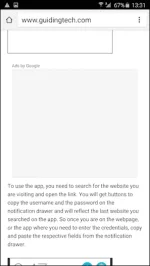
Only thing peculiar about #NoChromo is that while it does disable ads it leaves the ad frames in. So while browsing, you’ll see a lot of empty boxes with nothing in them.
Also, installing #NoChromo isn’t as easy as downloading an app from the Play Store. Click on the download link and find the version that’s compatible with your phone (direct download link You do not have permission to view the full content of this post. Log in or register now.). For most of you out there, it will be ARM64
I’m personally used to Chrome on my Android phone and any attempt at switching has been unsuccessful. If you’re like me, you’ll appreciate #NoChromo. Chrome for Android doesn’t support extensions. What #NoChromo does is it takes the open source version of Chrome for Android – Chromium, and just disables ads.
Everything else is the same. You can even sign in with your Google account to sync history and bookmarks.
Only thing peculiar about #NoChromo is that while it does disable ads it leaves the ad frames in. So while browsing, you’ll see a lot of empty boxes with nothing in them.
Also, installing #NoChromo isn’t as easy as downloading an app from the Play Store. Click on the download link and find the version that’s compatible with your phone (direct download link You do not have permission to view the full content of this post. Log in or register now.). For most of you out there, it will be ARM64