 PH
PHMay mga pagkakataon na gusto sana natin magcopy paste na lang kaso di pwede dahil nakatago ang ilang texts sa screen. Isang example na dyan ang study.com....
pero may nalaman akong trick...
basics lang siguro sa iba pero pinaghirapan kong halungkatin to a...
kapag may ganito sa website..
 1. punta nyo cursor sa text na hindi mabasa tsaka right click
2. piliin ang inspect na option.. ganito dapat magpakita.
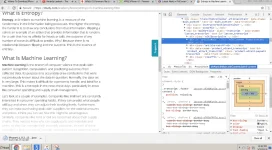
3. then click nyo yung wikicontent ng dalawang beses..
4. palitan nyo yung nakasulat na "wikiContent faded-content" ng kahit ano..
5. tingnan mo ulit yung hidden na text... nababasa na!!!
hahaha... ok ba? palike naman, at palo mo na rin para maistablish na me... hehehe
pero may nalaman akong trick...
basics lang siguro sa iba pero pinaghirapan kong halungkatin to a...
kapag may ganito sa website..
1. punta nyo cursor sa text na hindi mabasa tsaka right click2. piliin ang inspect na option.. ganito dapat magpakita.
3. then click nyo yung wikicontent ng dalawang beses..
4. palitan nyo yung nakasulat na "wikiContent faded-content" ng kahit ano..
5. tingnan mo ulit yung hidden na text... nababasa na!!!
hahaha... ok ba? palike naman, at palo mo na rin para maistablish na me... hehehe
