 PH
PHSurrenderme
Eternal Poster
Things you'll need:
* VPS/Dedicated server (CentOS, Ubuntu)
* A brain
1. Update
Code:
yum update (Ubuntu: sudo apt-get update && upgrade)
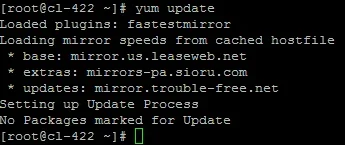
I have already updated mine.
2. Install gcc, make, nano
Code:
yum install gcc make nano (Ubuntu: sudo apt-get install gcc make nano)
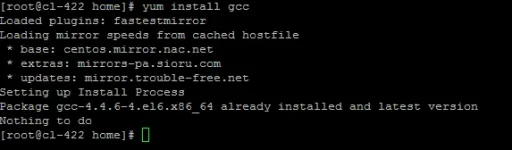
I have mine already installed to the newest version.
3. Download UnrealIRCD 3.2
Code:
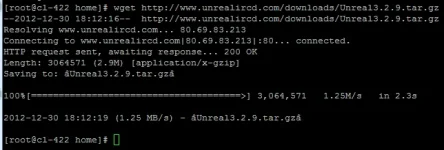
wget You do not have permission to view the full content of this post. Log in or register now.
4. Extract the files
Code:
tar xf Unreal3.2.9.tar.gz

5. If you plan on having more than 1024 users/bots, upgrade the setsize.
Code:
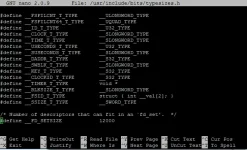
nano /usr/include/bits/typesizes.h
Scroll down to "#define __FD_SETSIZE 1024" and change 1024 to 12000 (or how much you plant to old).
Save the file.(Ctrl & X, Y, Enter)
6.Enter Unreal folder:
Code:
cd Unreal3.2

7.Enter Unreal config
Code:
./Config
Hold enter until it says 100% on the bottom or when it says "[Enter to continue]"
Press enter until you get to "How many file descriptors (or sockets) can the IRCd use? [1024] ->" Type 12000 and press enter for the rest

8. Copy and paste this code from the pastebin link I provide, it is the unrealircd.conf. You do not have permission to view the full content of this post. Log in or register now.
Type, nano unrealircd.conf
Then paste the code from pastebin, if you use Putty right click to paste.
After, edit to your liking.
MAKES SURE YOU CHANGE THE FIRST MAX CLIENTS TO THE LIMIT YOU PUT WHEN YOU CONFIGURED
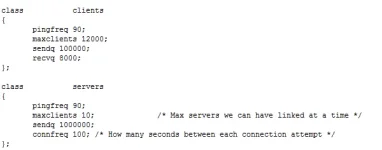
Under the oper block, I would add these lines
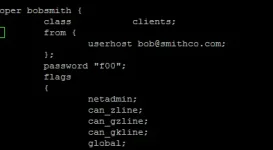
add
Code:
global;
services-admin;
can_rehash;
can_die;
can_restart;
helpop;
can_wallops;
can_globops;
can_localroute;
can_globalroute;
can_localkill;
can_globalkill;
can_kline;
can_gzline;
can_gkline;
can_unkline;
can_localnotice;
can_globalnotice;
netadmin;
can_zline;
get_umodew;
get_host;
can_override;
Should look like this when you are done.
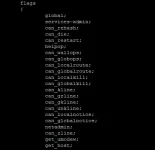
Save the file (Ctrl & X, Y, Enter)
9. Type: make
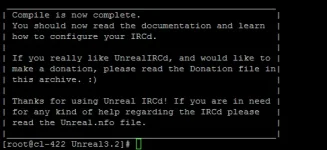
10. Start your IRC
** If you get an error saying could not find, ircd.motd.fr, ircd.rules.fr, ircd.log. Just type: touch ircd.motd.fr ircd.rules.fr ircd.log
Type..
Code:
ulimit -n 12000;./unreal start
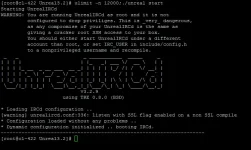
You will now be able to connect to your IRC using a client like "mIRC" for Windows, "LimeChat" for Mac, or "KVIrc" for Linux."
Thank you for looking at my TUT, I hope you enjoyed it
Hit that thumbs up button and comment down below
And also Don't forget to follow my team
Anonymous

Tinanggal ko muna mga image kasi di na kasi may limit haha.
* VPS/Dedicated server (CentOS, Ubuntu)
* A brain
1. Update
Code:
yum update (Ubuntu: sudo apt-get update && upgrade)
I have already updated mine.
2. Install gcc, make, nano
Code:
yum install gcc make nano (Ubuntu: sudo apt-get install gcc make nano)
I have mine already installed to the newest version.
3. Download UnrealIRCD 3.2
Code:
wget You do not have permission to view the full content of this post. Log in or register now.
4. Extract the files
Code:
tar xf Unreal3.2.9.tar.gz
5. If you plan on having more than 1024 users/bots, upgrade the setsize.
Code:
nano /usr/include/bits/typesizes.h
Scroll down to "#define __FD_SETSIZE 1024" and change 1024 to 12000 (or how much you plant to old).
Save the file.(Ctrl & X, Y, Enter)
6.Enter Unreal folder:
Code:
cd Unreal3.2
7.Enter Unreal config
Code:
./Config
Hold enter until it says 100% on the bottom or when it says "[Enter to continue]"
Press enter until you get to "How many file descriptors (or sockets) can the IRCd use? [1024] ->" Type 12000 and press enter for the rest
8. Copy and paste this code from the pastebin link I provide, it is the unrealircd.conf. You do not have permission to view the full content of this post. Log in or register now.
Type, nano unrealircd.conf
Then paste the code from pastebin, if you use Putty right click to paste.
After, edit to your liking.
MAKES SURE YOU CHANGE THE FIRST MAX CLIENTS TO THE LIMIT YOU PUT WHEN YOU CONFIGURED
Under the oper block, I would add these lines
add
Code:
global;
services-admin;
can_rehash;
can_die;
can_restart;
helpop;
can_wallops;
can_globops;
can_localroute;
can_globalroute;
can_localkill;
can_globalkill;
can_kline;
can_gzline;
can_gkline;
can_unkline;
can_localnotice;
can_globalnotice;
netadmin;
can_zline;
get_umodew;
get_host;
can_override;
Should look like this when you are done.
Save the file (Ctrl & X, Y, Enter)
9. Type: make
10. Start your IRC
** If you get an error saying could not find, ircd.motd.fr, ircd.rules.fr, ircd.log. Just type: touch ircd.motd.fr ircd.rules.fr ircd.log
Type..
Code:
ulimit -n 12000;./unreal start
You will now be able to connect to your IRC using a client like "mIRC" for Windows, "LimeChat" for Mac, or "KVIrc" for Linux."
Thank you for looking at my TUT, I hope you enjoyed it
Hit that thumbs up button and comment down below
And also Don't forget to follow my team
Anonymous
Tinanggal ko muna mga image kasi di na kasi may limit haha.
- armanx13
Addict - codeError
Forum Veteran - HeartStealer
Addict - Jebi
Addict - kkazuto111
Addict - kolinz
Honorary Poster - mark_bhe_18
Addict - R A L P H
Eternal Poster - remobaview
Eternal Poster - Surrenderme
Eternal Poster - thanskie07
Honorary Poster - TheSilent
Enthusiast - The_killer 01
Eternal Poster - Thiel
Addict - vinsmoke29
Enthusiast - Wooty-PHC
Honorary Poster - Your Account
Forum Guru - Zipeee04
Journeyman