 PH
PHWelcome to this thread for the Crappy PLDT PROLiNK PRS1241B Router
If you have this modem with full of potential but "Wasted as it can ever be"

So you just wanted to Bridge it, then this can help you
This tutorial is just a "Workaround" not really bridge mode, but it can help a bit.
Step 1
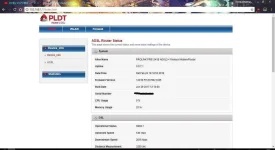
Go to your router webpage then login
Step 2
Copy then paste this
You do not have permission to view the full content of this post. Log in or register now.
to open the QOS tab then Disable it.

Step 3
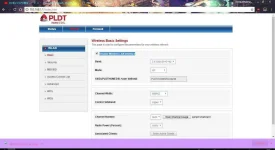
Then Disable The Wifi Interface of the Router
Bonus 1
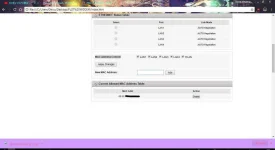
To Restrict the access of the LAN so the other router could only connect and not anyone can connect by plugging the LAN Cable on the crappy pldt router.
Go here You do not have permission to view the full content of this post. Log in or register now. then scroll down
Then tick all the boxes as shown in the picture, then put the MAC Address of the router you only want to connect on the crappy PLDT router.
Bonus 2
To Change the DSL modulations, example is if you prefer ADSL1 than ADSL2 so you want to force your router on it, you can do so in You do not have permission to view the full content of this post. Log in or register now.
Bonus 3
To simply reboot the modem without going to the modem itself
Go to You do not have permission to view the full content of this post. Log in or register now.
Again PLDT, you really suck, this modem can do better job if you are not so "restrictive" to the modem
If you have this modem with full of potential but "Wasted as it can ever be"
So you just wanted to Bridge it, then this can help you
This tutorial is just a "Workaround" not really bridge mode, but it can help a bit.
Step 1
Go to your router webpage then login
Step 2
Copy then paste this
You do not have permission to view the full content of this post. Log in or register now.
to open the QOS tab then Disable it.
Step 3
Then Disable The Wifi Interface of the Router
Bonus 1
To Restrict the access of the LAN so the other router could only connect and not anyone can connect by plugging the LAN Cable on the crappy pldt router.
Go here You do not have permission to view the full content of this post. Log in or register now. then scroll down
Then tick all the boxes as shown in the picture, then put the MAC Address of the router you only want to connect on the crappy PLDT router.
Bonus 2
To Change the DSL modulations, example is if you prefer ADSL1 than ADSL2 so you want to force your router on it, you can do so in You do not have permission to view the full content of this post. Log in or register now.
Bonus 3
To simply reboot the modem without going to the modem itself
Go to You do not have permission to view the full content of this post. Log in or register now.
Again PLDT, you really suck, this modem can do better job if you are not so "restrictive" to the modem