 PH
PHacervergel87
Forum Guru
I've got 3 tricks that can bring your full screen game into window mode.
A. Winexplorer tool
1. download the tools and extract it ---> You do not have permission to view the full content of this post. Log in or register now.
2. run your game, set to desired resolution (less than your overall monitor display, so my monitor displays at 1360x768 so I set game to 1280x720)
3. alt + tab, run winexplorer, select your game, go to style, check WS_DISABLED and WS_CHILD. Close winexplorer.when you click back to the game it will be in window mode.
Done, hope this helps!
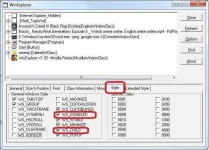
screenshot
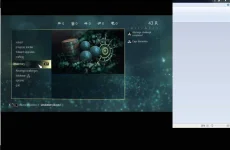
(if ayaw gumana ng tool na ito it means may option sa game nyo na window mode or pwede ma turn off ang fullscreen.)
B. Dxwnd tool
download the tool here: You do not have permission to view the full content of this post. Log in or register now.
1. extract and open dxwnd.exe
2. go to edit, go to "main", enter your game name , next is the "path" or location of the game and locate the exe file.
3. click ok, If you can see circle with green color that means it is ready to go.
4. go to file and save it.
5. right click the game you've added and click "run" to execute game.
6. that's all
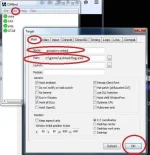
C. Add -windowed or -w command on your game shortcut
steps.
1. go to your desktop, look for the game shortcut icon or create a shortcut to your game.
2. right click it, hit properties, click shortcut, navigate on target and add " -windowed or -w on the last part of the game path. hit apply and ok.
3. Try to lunch your game.
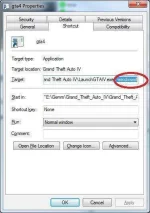
A. Winexplorer tool
1. download the tools and extract it ---> You do not have permission to view the full content of this post. Log in or register now.
2. run your game, set to desired resolution (less than your overall monitor display, so my monitor displays at 1360x768 so I set game to 1280x720)
3. alt + tab, run winexplorer, select your game, go to style, check WS_DISABLED and WS_CHILD. Close winexplorer.when you click back to the game it will be in window mode.
Done, hope this helps!
screenshot
(if ayaw gumana ng tool na ito it means may option sa game nyo na window mode or pwede ma turn off ang fullscreen.)
B. Dxwnd tool
download the tool here: You do not have permission to view the full content of this post. Log in or register now.
1. extract and open dxwnd.exe
2. go to edit, go to "main", enter your game name , next is the "path" or location of the game and locate the exe file.
3. click ok, If you can see circle with green color that means it is ready to go.
4. go to file and save it.
5. right click the game you've added and click "run" to execute game.
6. that's all
C. Add -windowed or -w command on your game shortcut
steps.
1. go to your desktop, look for the game shortcut icon or create a shortcut to your game.
2. right click it, hit properties, click shortcut, navigate on target and add " -windowed or -w on the last part of the game path. hit apply and ok.
3. Try to lunch your game.