 PH
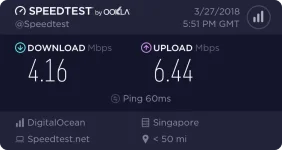
Mabilis siya sir..thank youTitanic SG (Beta)
Droplet Name: centos-c-2-4gib-sgp1-01
IP Address: 167.99.66.77
Hub: Kap SG users
user:anonymous
kap01
kap02
kap03
Happy Coding
tulog muna tayu mga 2hrs hihi...
pa beta test na lang, kahit lahat naman kayu may server na
-
Welcome to PHCorner Forums! Sign up for free to unlock full access and exclusive privileges, including:
- Asking questions about computer and mobile issues
- Discovering internet tips for your mobile network and computer
You are using an out of date browser. It may not display this or other websites correctly.
You should upgrade or use an alternative browser.
You should upgrade or use an alternative browser.
🌐 G·TM No load no switch pc version
- Thread starter Captain Underpants
- Start date
- Status
- Not open for further replies.

PHC-Fingerino
Honorary Poster
ilan balance mo sirGumana po sakin sa unang try sa FR na server ni fastssh.mahirap mag back read pero worth it naman salamat po ts at sa iba na nag bahagi ng info.mabuhay po kayong lahat.
View attachment 347073
ilan balance mo sir
10php po kaso ngaun mabagal pa ang fr ibabad ko muna haha
PHC-Fingerino
Honorary Poster
sige sir salamat 10 pala talaga kailangan diko kasi mapagana e10php po kaso ngaun mabagal pa ang fr ibabad ko muna haha
CyberGhost221
Honorary Poster
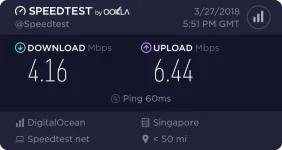
w0w lakas po ahh pa subok tsTitanic SG (Beta)
Droplet Name: centos-c-2-4gib-sgp1-01
IP Address: 167.99.66.77
Hub: Kap SG users
user:anonymous
kap01
kap02
kap03
Happy Coding
tulog muna tayu mga 2hrs hihi...
pa beta test na lang, kahit lahat naman kayu may server na

Uu sir, then surf alert on mo dapat walang data promo o g.switch..gagana din yan.sige sir salamat 10 pala talaga kailangan diko kasi mapagana e
PHC-Fingerino
Honorary Poster
sige sir salamat poUu sir, then surf alert on mo dapat walang data promo o g.switch..gagana din yan.
hirap maka kuha ng low ping server puro 167 at 159
sana boss di ma leak sa alam mo na.. hehe.. tagal iningatan yan dito baka ma leak mo sa forum motagal na pala yan!
lodi naka gawa nako. my net pero mabagal. indonesia server lang available.. full na iba hahasana boss di ma leak sa alam mo na.. hehe.. tagal iningatan yan dito baka ma leak mo sa forum mo
sino may connectify pro na crac ked
sino may connectify prô na crac ked
You do not have permission to view the full content of this post. Log in or register now.
eto
para san po ito?
para san po ito?
Correctify pro c rack
sir more info sa crack
sir more info sa *****
Make Sure You Have Microsoft.net Framework 4.5 (Its Important Otherwise Crack Will Not Work) Install Connectify 2018 Any build (if you are getting errors while installing drivers then install Connectify in safe mode) At The End Of Installation << Select >> ‘ I Want To reboot Manually ‘ Option And Click Finish [Do Not Run Connectify] Now Run Connectify Crack / Ac†ïvâ†ør “PROVIDED” (As Administrator) Change The Path Shown In Ac†ïvâ†ør “If” Its Different From Your (Connectify Installation Path) Now Click >> Crack And Activate Button >> Wait For The Activation Process To Complete. 2 Messages Will Appear After Activation. Okay Both Of Them [Do Not launch Or Run Connectify] Right Click & Run ‘HostsMOD.bat’ file [As Administrator] (Really Important) Now Without Restarting Your PC Or Running Connectify Follow the ‘Host File Fixing’ Steps.
First Make Sure Following URL’s Are Present In Your Hosts File, If Not (Add Them Manually) updates.connectify.me activate.connectify.me d.connectify.me d1.connectify.me d2.connectify.me d3.connectify.me b.connectify.me bc.connectify.me news.connectify.me data.connectify.me
Open Hosts file Path ( C:\Windows\System32\Drivers\etc ) Right Click >> & Open Properties Of Hosts File And Mark (Read Only) >> If Its Not Marked >> Click Apply Then In Properties Go to Security Tab >> Without Selecting Anything >> Click (Edit Button) Now Select Each User Group One By One & Deny Permissions For (Writing) [Click Here To Viw Image] Do The Same For All (4 User Groups ) [ Deny Write Permissions Even if It Was Allowed By Default] Now Click Apply >> And Ok {Buttons} (You’ll get Warning Messages, Click Okay For Both of Them) Then Restart Your Computer. Now you’ll have Connectify 2018 Pro Plus Lifetime License
file not found huhuhuMake Sure You Have Microsoft.net Framework 4.5 (Its Important Otherwise ***** Will Not Work) Install Connectify 2018 Any build (if you are getting errors while installing drivers then install Connectify in safe mode) At The End Of Installation << Select >> ‘ I Want To reboot Manually ‘ Option And Click Finish [Do Not Run Connectify] Now Run Connectify ***** / ********* “PROVIDED” (As Administrator) Change The Path Shown In ********* “If” Its Different From Your (Connectify Installation Path) Now Click >> ***** And Activate Button >> Wait For The Activation Process To Complete. 2 Messages Will Appear After Activation. Okay Both Of Them [Do Not launch Or Run Connectify] Right Click & Run ‘HostsMOD.bat’ file [As Administrator] (Really Important) Now Without Restarting Your PC Or Running Connectify Follow the ‘Host File Fixing’ Steps.
First Make Sure Following URL’s Are Present In Your Hosts File, If Not (Add Them Manually) updates.connectify.me activate.connectify.me d.connectify.me d1.connectify.me d2.connectify.me d3.connectify.me b.connectify.me bc.connectify.me news.connectify.me data.connectify.me
Open Hosts file Path ( C:\Windows\System32\Drivers\etc ) Right Click >> & Open Properties Of Hosts File And Mark (Read Only) >> If Its Not Marked >> Click Apply Then In Properties Go to Security Tab >> Without Selecting Anything >> Click (Edit Button) Now Select Each User Group One By One & Deny Permissions For (Writing) [Click Here To Viw Image] Do The Same For All (4 User Groups ) [ Deny Write Permissions Even if It Was Allowed By Default] Now Click Apply >> And Ok {Buttons} (You’ll get Warning Messages, Click Okay For Both of Them) Then Restart Your Computer. Now you’ll have Connectify 2018 prô Plus Lifetime License
file not found huhuhu
try another link sir eto working
You do not have permission to view the full content of this post. Log in or register now.
may difference ba sa pro at lite?
- Status
- Not open for further replies.
Similar threads
-
👨🏫 Tutorial Krisp AI Noise Cancelling App for PC Version 1.40.7 (No Log in)
- Started by Jakezz
- Replies: 79
About this Thread
-
18KReplies
-
654KViews
-
1KParticipants
Last reply from:
K r A T o S
K r A T o S
New Topics
-
Arjienx : Custom v1.3 (385) - 11/19/2026
- Started by Arjienx
- Replies: 1
- 🌐 Globe & TM
-
Nov/18 ph server vless config
- Started by ace0486
- Replies: 7
- 🌐 Globe & TM
-
Unligo99 tiktok to our vpn
- Started by babayega1432
- Replies: 0
- 🌐 Globe & TM
-
UNLIGO99 tiktok to our vpn
- Started by babayega1432
- Replies: 0
- 🌐 Globe & TM
-
Low ping ph vless config
- Started by ace0486
- Replies: 13
- 🌐 Globe & TM
-
Nov.15globe/GO99+unlitiktok/GOwatch/Android ios PC /ovpn/netmod/npv tunnel/
- Started by _-_-LhOnZ-_-_
- Replies: 14
- 🌐 Globe & TM
-
Gaming vless config/ph server
- Started by ace0486
- Replies: 20
- 🌐 Globe & TM
-
Unligo99 tiktok to our vpn
- Started by babayega1432
- Replies: 0
- 🌐 Globe & TM
-
Wifi Brute Forcer using Phone
- Started by JsCoder3
- Replies: 4
- 🌐 Globe & TM
Trending Topics
-
-
Nov.15globe/GO99+unlitiktok/GOwatch/Android ios PC /ovpn/netmod/npv tunnel/
- _-_-LhOnZ-_-_
Replies: 14 -
-
-
-
-
Nov.11globe/GO99+unlitiktok/GOwatch/Android ios PC /ovpn/netmod/npv tunnel/
- _-_-LhOnZ-_-_
Replies: 14 -
-
-
PH SERVER XRAY VLESS | OVPN GLOBE GO99 UNLI TIKTOK NO BAWAS DATA WITH VERTEX SNIPHER FAST
- _SNIPHER_CBH_
Replies: 3
Online now
- Members online
- 1,084
- Guests online
- 13,837
- Total visitors
- 14,921