 PH
PH- These are the You do not have permission to view the full content of this post. Log in or register now..
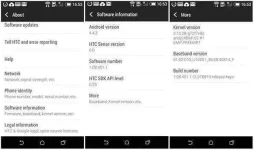
Go to your settings then About > More > Build number. / © ANDROIDPIT
Go back to the original settings menu and tap the "Developer options" button. Head to the bottom of the next page and tap advanced. On the advanced tab, scroll to "Force 4x MSAA" and tick the box.
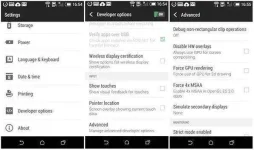
Once Developer options is enabled, enter it and go to Advanced > Force 4x MSAA. / © ANDROIDPIT
When you now enter Spider-man Unlimited, the result should be the reduction of the “staircase effect” or jagged pixel edges around your character. Here is an example.
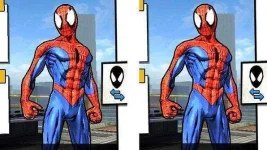
With antialiasing enabled (right), this reduces the staircase effect to object edges. / © ANDROIDPIT
- Discover the You do not have permission to view the full content of this post. Log in or register now..
So there you have it. Now you can enjoy your Android games with improved image quality. Did this tip work for you?
(based on an article by You do not have permission to view the full content of this post. Log in or register now. of AndroidPIT Germany)
