 PH
PHThat Poppy
Forum Guru
SURVEY LIKE A TECHNICIAN
Tired of asking PLDT if you got a slot for a fibr connection only to get a frustrating response that you can’t apply for a connection since it’s full? And then being asked if you want to upgrade your plan application so you could get a connection? Bummer right?Well to save you the hassle, I can show you the way on how it works and how to check it without having to open the box.
But of course you’d be asking this first: What the heck should I look for?
Okay, lemme show you what you need to look at:
NETWORK ACCESS POINTS (NAP)
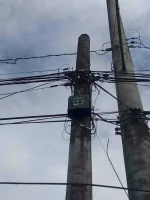
Yes, this black box right here is a Network Access Point. It houses all the fiber optic cables connected to it and that’s the conduit that makes the connection from there to your house then to the router.
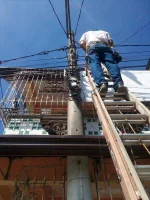
Now if you look here, you’ll see a field technician doing his work. He just opened up the box, this one’s silver and it’s a new one. Yep, there are newer NAP models out there so just check the coding that you saw above (LP 15 NP 7)
How many slots does it hold though?
Now we’ll take a closer look.
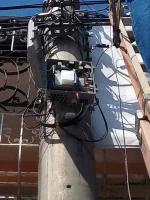
See those gray connectors on the right side? Yes, with those blue tips? Those are SC connectors or Standard Connectors/Subscriber Connectors which are connected to the ports as you can see. You’ll count from the bottom and you’ll see eight of them connected. That’s the maximum capacity for a single NAP unless it’s a double NAP that houses 16 connections. Why don’t they install double NAPs instead? The standard is only the 8 connection capacity since it’s not guaranteed that every subscriber would line up for a connection, building one and if it gets unused is just a waste of resources it seems.
TIME TO THINK OUTSIDE THE BOX
Now for the main event, showing you the innards of the NAP might be nifty but you can’t just get a ladder and try to pry it open. The law would be on your arse if you try to do just that so we’ll try an easy method that would require your 20/20 eyeballs and sun glare resistance.

See those loops down there? Yeah, those dangling wires. That’s the secret to knowing if you still got a slot.
If you count em above you’ll get either 5 or 6, depends on how well your eyesight is.
I count 5.
A close approximation is enough. If you count 5 or 6 then that’s good to go. Immediately apply for one. And if you count 6-7, Your chances may be slim, but there is hope, go ask your neighbors if they still use that line so you could get a connection, you could trace it from there to their homes.
That would save you time taking a trip to PLDT’s business offices or calling to know if you got a slot. And if you’re applying for a connection, list down the LP and NP and how many slots there is so you could get a technician to install your fiber connection ASAP.
Sauce: You do not have permission to view the full content of this post. Log in or register now.
Tired of asking PLDT if you got a slot for a fibr connection only to get a frustrating response that you can’t apply for a connection since it’s full? And then being asked if you want to upgrade your plan application so you could get a connection? Bummer right?Well to save you the hassle, I can show you the way on how it works and how to check it without having to open the box.
But of course you’d be asking this first: What the heck should I look for?
Okay, lemme show you what you need to look at:
NETWORK ACCESS POINTS (NAP)
Yes, this black box right here is a Network Access Point. It houses all the fiber optic cables connected to it and that’s the conduit that makes the connection from there to your house then to the router.
Now if you look here, you’ll see a field technician doing his work. He just opened up the box, this one’s silver and it’s a new one. Yep, there are newer NAP models out there so just check the coding that you saw above (LP 15 NP 7)
How many slots does it hold though?
Now we’ll take a closer look.
See those gray connectors on the right side? Yes, with those blue tips? Those are SC connectors or Standard Connectors/Subscriber Connectors which are connected to the ports as you can see. You’ll count from the bottom and you’ll see eight of them connected. That’s the maximum capacity for a single NAP unless it’s a double NAP that houses 16 connections. Why don’t they install double NAPs instead? The standard is only the 8 connection capacity since it’s not guaranteed that every subscriber would line up for a connection, building one and if it gets unused is just a waste of resources it seems.
TIME TO THINK OUTSIDE THE BOX
Now for the main event, showing you the innards of the NAP might be nifty but you can’t just get a ladder and try to pry it open. The law would be on your arse if you try to do just that so we’ll try an easy method that would require your 20/20 eyeballs and sun glare resistance.
See those loops down there? Yeah, those dangling wires. That’s the secret to knowing if you still got a slot.
If you count em above you’ll get either 5 or 6, depends on how well your eyesight is.
I count 5.
A close approximation is enough. If you count 5 or 6 then that’s good to go. Immediately apply for one. And if you count 6-7, Your chances may be slim, but there is hope, go ask your neighbors if they still use that line so you could get a connection, you could trace it from there to their homes.
That would save you time taking a trip to PLDT’s business offices or calling to know if you got a slot. And if you’re applying for a connection, list down the LP and NP and how many slots there is so you could get a technician to install your fiber connection ASAP.
Sauce: You do not have permission to view the full content of this post. Log in or register now.
