 PH
PH[Bipolar Tutorials]
How to Block Ads Without Using Any Adblocker Application
First Method : Using DNS Changer
Step 1 : Download This App DNS Changer You do not have permission to view the full content of this post. Log in or register now.
Step 2 : Install the App
Step 3 : After Installing Run the App
and Put this on the Configuration
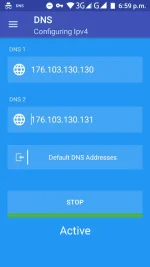
Step 4 : Press Start and You're All Set(Easy Right)
Second Method : Using Http Injector
Step 1 : Open Http Injector App kung Wala Kapa Download Mo Dito
You do not have permission to view the full content of this post. Log in or register now.
Step 2 : Click Menu Yung Tatlong Parallel Lines Na Pa Horizontal
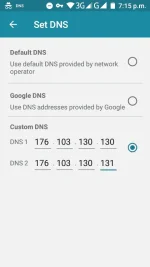
Stel 3 : Navigate to Setting and Click Set DNS and Put This on Custom DNS and Start Connecting
#Like
#Fedback
How to Block Ads Without Using Any Adblocker Application
First Method : Using DNS Changer
Step 1 : Download This App DNS Changer You do not have permission to view the full content of this post. Log in or register now.
Step 2 : Install the App
Step 3 : After Installing Run the App
and Put this on the Configuration
Step 4 : Press Start and You're All Set(Easy Right)
Second Method : Using Http Injector
Step 1 : Open Http Injector App kung Wala Kapa Download Mo Dito
You do not have permission to view the full content of this post. Log in or register now.
Step 2 : Click Menu Yung Tatlong Parallel Lines Na Pa Horizontal
Stel 3 : Navigate to Setting and Click Set DNS and Put This on Custom DNS and Start Connecting
#Like
#Fedback
