 PH
PHIf you want to delete Xiaomi account permanently then you can follow the steps given below. Remember that deleting your Mi Account will delete all your Sync Data with Mi Cloud.
1. First, Go to You do not have permission to view the full content of this post. Log in or register now.
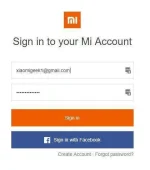
2. On that page, you need to log in with the account which you want to delete. Enter your Email/Phone & Password to Sign in.

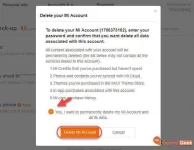
3. After Login, You will see popup giving your warning about account deletion.Tick on “Yes” & select “Delete Mi Account“.

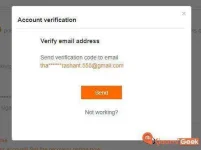
4. In the next step, Mi Needs to verify your email address. Click on “Send” button to receive a Verification code on your mail account or on Mobile Number.

5. Enter the received Verification Code in the box & Click on “Submit“.
6. Finally, Press “Delete Account” to delete your Mi Account Permanently.
This was the overall procedure to remove Mi account & Delete Xiaomi account permanently from your Xiaomi device within few minutes.
source:xiaomigeek.com
~Professora Hakimi Kazumi
Asianism
1. First, Go to You do not have permission to view the full content of this post. Log in or register now.
2. On that page, you need to log in with the account which you want to delete. Enter your Email/Phone & Password to Sign in.
3. After Login, You will see popup giving your warning about account deletion.Tick on “Yes” & select “Delete Mi Account“.
4. In the next step, Mi Needs to verify your email address. Click on “Send” button to receive a Verification code on your mail account or on Mobile Number.
5. Enter the received Verification Code in the box & Click on “Submit“.
6. Finally, Press “Delete Account” to delete your Mi Account Permanently.
This was the overall procedure to remove Mi account & Delete Xiaomi account permanently from your Xiaomi device within few minutes.
source:xiaomigeek.com
~Professora Hakimi Kazumi
Asianism
 ....
....