 PH
PHJustin-5102-
Enthusiast
Pano bumisita sa ipangbabawal na sites na sikreto sa internet.
This is just educational Purposes Only. Please Do This On Your Own RISK.
Step 1. Download TOR. You do not have permission to view the full content of this post. Log in or register now. Kung gusto mo pwede rin install sa USB Drive Para mas security ang paggamit at di makita ang files mo ng browser at anonymously surf or pwede rin naman install mo sa drive mo. pagkatapos ma install uncheck Run Tor Uncheck the 2 box.
Step 2. Download Betternet VPN. LINK You do not have permission to view the full content of this post. Log in or register now. VPN. When done.
Step 3. Open Tor Browser. And click connect. When done. Click The tor logo on the left-side of the browser then adjust the level security zone. to high.
Step 4. Open different browser "Google Chrome,Opera,Internet Explorer,Etc" then go to google.com and search Hidden Wiki open first link. there is the link of one of the DeepWeb Link Copy the link address and paste it to the url search engine of TOR. When You go to the Hidden Wiki Scroll down and you will see the link of the deepweb you will see all of the genre. Hidden Service,Marketplace Financial,Marketplace Commercial Services,häçking,etc you will see the secret of internet
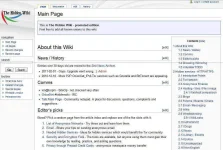
Step 5. You will see the Secret of the internet. In the Hidden Wiki, This is the ScreenShot in the Hidden Wiki in the Other Browser.

ITO ANG LALABAS SA TOR BROWSER. PLEASE BE CAREFUL AND ALWAYS TURN YOUR VPN ON. AND ANONYMOUS SURF, JUST BE CAREFUL!
YUN LANG! KUNG PANO MAKITA ANG DEEPWEB LINKS.
This is just educational Purposes Only. Please Do This On Your Own RISK.
Step 1. Download TOR. You do not have permission to view the full content of this post. Log in or register now. Kung gusto mo pwede rin install sa USB Drive Para mas security ang paggamit at di makita ang files mo ng browser at anonymously surf or pwede rin naman install mo sa drive mo. pagkatapos ma install uncheck Run Tor Uncheck the 2 box.
Step 2. Download Betternet VPN. LINK You do not have permission to view the full content of this post. Log in or register now. VPN. When done.
Step 3. Open Tor Browser. And click connect. When done. Click The tor logo on the left-side of the browser then adjust the level security zone. to high.
Step 4. Open different browser "Google Chrome,Opera,Internet Explorer,Etc" then go to google.com and search Hidden Wiki open first link. there is the link of one of the DeepWeb Link Copy the link address and paste it to the url search engine of TOR. When You go to the Hidden Wiki Scroll down and you will see the link of the deepweb you will see all of the genre. Hidden Service,Marketplace Financial,Marketplace Commercial Services,häçking,etc you will see the secret of internet
Step 5. You will see the Secret of the internet. In the Hidden Wiki, This is the ScreenShot in the Hidden Wiki in the Other Browser.
ITO ANG LALABAS SA TOR BROWSER. PLEASE BE CAREFUL AND ALWAYS TURN YOUR VPN ON. AND ANONYMOUS SURF, JUST BE CAREFUL!
YUN LANG! KUNG PANO MAKITA ANG DEEPWEB LINKS.