PH
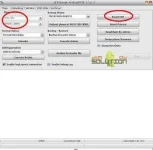
PH- Open NCK Dongle.
- Select Service tab.
- On Phone Settings, Select 0-By CPU,MT6735 ( for CM Flare A3).
- Click Reset FRP.
- Read the Confirmation Box and click YES to Confirm.
- Reinsert phone battery, Battery must be charged, Phone must be off with battery inside.
- Insert USB cable. then let the drivers automatically install.
- Wait till finish and Done.
- Download and open You do not have permission to view the full content of this post. Log in or register now.
- Installation password: GSMXTEAM<==Thanks and credit to these cool team.
- After installation, Run NCK MTK Full No HWID.exe found in default path:C:\Program Files\Gsm_X_Team\NCK AndroidMTK
Does it work? give us feedback by commenting below.