 PH
PHTata Scarface
Honorary Poster
Mixing and mastering vocals with cool edit pro
-->
Vocal Editing Process For Cool Edit Pro 2.0
We decided to combine and edit both of our processes and make it into 1 simple process. This is our vocal editing process to help you all out some. NOTE: This is mainly for the kats that dont have the top of the line compression mics etc. If you have a nice studio mic, you wont need to do all of this. If you have any questions, just hit us up on AIM.
-->
1.) Record your verse and then go to edit mixdown.
2.) Then click "Edit" and go down to convert sample type and choose "Stereo 32 Bit Mono"
3.) If you have a loud computer or any noise/hiss in your mic, i suggest taking a Noise Reduction. Select a portion of the vocals before u actually start spitting (at least 0.300 seconds) and go to "Noise Reduction>Noise Reduction". Set the Noise Reduction Level to 90%-95% and click "Get Profile From Selection." That gets the sample of noise that it is reducing. After that is done, click "OK" and you are done with that step.
4.) Next go to effects and pick amplitude and amplify. Choose center wave and click okay. Go to amplitude again and choose dynamic processing and choose classic soft knee.
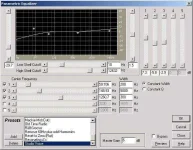
5.0 parametric eq
6.) Thats just to your verses when they are recorded. Do that to any part of your verse (incase you do a punch in). Then mix down your adlibs and doubles and do tha same thing to them. After you have mixed both parts, mix them all down together (without tha beat). That way you can have tha file with dubs/adlibs.
5.) Then select all and go to "Noise Reduction>Click/Pop Eliminator." Select "Constant Hiss and Crackle" then click "Auto Find Levels" After that's done click "OK."
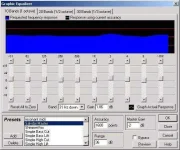
6.) Now click "Effects>Filters>Graphic Equalizer." Put these presets in and save it as "Salvdor/Chosen Master" for next time you use it.
1st bar: band 31 hz, 1.86 db
2nd bar: band 62.5 hz, gain 1.03db
3rd bar: band 125 hz, gain 1.45db
4th bar: band 250 hz, gain .62 db
5th bar: band 500 hz, gain .62 db
6th bar: band 1000 hz, gain .62 db
7th bar: band 2000 hz, gain 3.1 db
8th bar: band 4000 hz, gain 1.03 db
9th bar: band 8000 hz, gain 0 db
10th bar: band 16 Hz up, gain 2.28 db
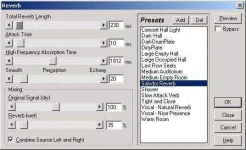
7.) Next is the reverb. Go to "Effects>Delay Effects>Reverb." Again, put these presets in and save it as "Salvdor/Chosen Reverb" for next time you use it.
-->
8.) Last is the "Master Width." Go to Effects>Amplitude>Pan Expand and click on "Master Width" then click "OK."
9.) Now just mix down the whole song (including beat), 192 Kbs, 44100 Hz, Stereo (7:4:1) for cd quality!
-->
Vocal Editing Process For Cool Edit Pro 2.0
We decided to combine and edit both of our processes and make it into 1 simple process. This is our vocal editing process to help you all out some. NOTE: This is mainly for the kats that dont have the top of the line compression mics etc. If you have a nice studio mic, you wont need to do all of this. If you have any questions, just hit us up on AIM.
-->
1.) Record your verse and then go to edit mixdown.
2.) Then click "Edit" and go down to convert sample type and choose "Stereo 32 Bit Mono"
3.) If you have a loud computer or any noise/hiss in your mic, i suggest taking a Noise Reduction. Select a portion of the vocals before u actually start spitting (at least 0.300 seconds) and go to "Noise Reduction>Noise Reduction". Set the Noise Reduction Level to 90%-95% and click "Get Profile From Selection." That gets the sample of noise that it is reducing. After that is done, click "OK" and you are done with that step.
4.) Next go to effects and pick amplitude and amplify. Choose center wave and click okay. Go to amplitude again and choose dynamic processing and choose classic soft knee.
5.0 parametric eq
6.) Thats just to your verses when they are recorded. Do that to any part of your verse (incase you do a punch in). Then mix down your adlibs and doubles and do tha same thing to them. After you have mixed both parts, mix them all down together (without tha beat). That way you can have tha file with dubs/adlibs.
5.) Then select all and go to "Noise Reduction>Click/Pop Eliminator." Select "Constant Hiss and Crackle" then click "Auto Find Levels" After that's done click "OK."
6.) Now click "Effects>Filters>Graphic Equalizer." Put these presets in and save it as "Salvdor/Chosen Master" for next time you use it.
1st bar: band 31 hz, 1.86 db
2nd bar: band 62.5 hz, gain 1.03db
3rd bar: band 125 hz, gain 1.45db
4th bar: band 250 hz, gain .62 db
5th bar: band 500 hz, gain .62 db
6th bar: band 1000 hz, gain .62 db
7th bar: band 2000 hz, gain 3.1 db
8th bar: band 4000 hz, gain 1.03 db
9th bar: band 8000 hz, gain 0 db
10th bar: band 16 Hz up, gain 2.28 db
7.) Next is the reverb. Go to "Effects>Delay Effects>Reverb." Again, put these presets in and save it as "Salvdor/Chosen Reverb" for next time you use it.
-->
8.) Last is the "Master Width." Go to Effects>Amplitude>Pan Expand and click on "Master Width" then click "OK."
9.) Now just mix down the whole song (including beat), 192 Kbs, 44100 Hz, Stereo (7:4:1) for cd quality!