PH
PHHey guys,
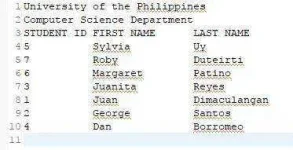
Heto na ang last part ng series na ito. Writing output to a txt file.
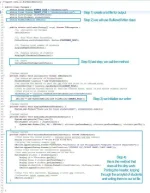
Kung sinusundan nyo ito at meron na kayong mga source code, kailangan lang natin baguhin ng konti ang MainApp class.
Nothing complicated. It's just straightforward writing to file.
BTW, kung napansin nyo ang buong application natin, WALA kang makikitang MAHAHABANG logic codes. Walang if-then-else, walang katakot takot na mga logic codes...walang mahahabang PAG IISIP. Just pure class attributes and methods and still our program works and do what we want it to do.
(Of course, from this point, you can put as many logic as you want, depende sa gusto nyong feature).
But the point is, think simple and do not make your application very very complicated. OOP really makes creating application simple.
Here's the snapshot. Edit nyo konti ang MainApp and that's it!
Goodluck and happy coding!
Heto na ang last part ng series na ito. Writing output to a txt file.
Kung sinusundan nyo ito at meron na kayong mga source code, kailangan lang natin baguhin ng konti ang MainApp class.
Nothing complicated. It's just straightforward writing to file.
BTW, kung napansin nyo ang buong application natin, WALA kang makikitang MAHAHABANG logic codes. Walang if-then-else, walang katakot takot na mga logic codes...walang mahahabang PAG IISIP. Just pure class attributes and methods and still our program works and do what we want it to do.
(Of course, from this point, you can put as many logic as you want, depende sa gusto nyong feature).
But the point is, think simple and do not make your application very very complicated. OOP really makes creating application simple.
Here's the snapshot. Edit nyo konti ang MainApp and that's it!
Goodluck and happy coding!