 PH
PHsa mga di pa nakakaalam pano i HOTSPOT ang phone na di na kailangan i root while using vpn, follow the steps below.
Step 1: turn on your mobile data and connect your vpn app (HTTP INJECTOR, PSIPHON, POSTERN, etc...)
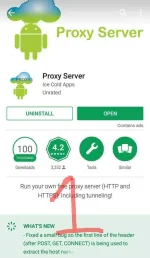
Step 2: download the app proxy server in playstore. (see picture 1)
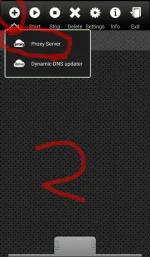
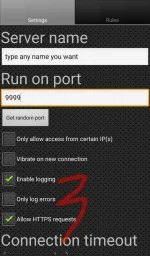
Step 3: open proxy server app. click add, click proxy server then go to settings tab katabi ng rules and type any name you want in server name. (see picture 2 and 3)
Step 4: put 9999 on run on port ( see picture 3)
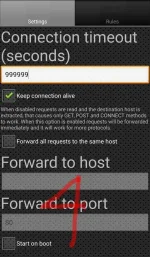
Step 5: put 99999999 on Connection timeout ( see picture 4)
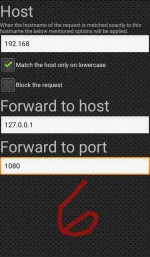
Step 6: go to rules then click add then type 192.168 on host (see picture 5 and 6)
Step 7: go to forward to host then put 127.0.0.1, then forward to port type 1080 ( see picture 6)
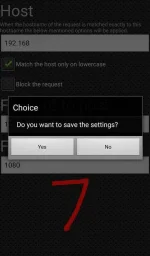
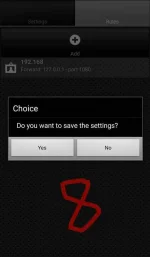
Step 8: press back then save, back again then save ( see picture 7 and 8)
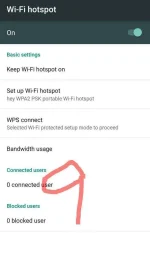
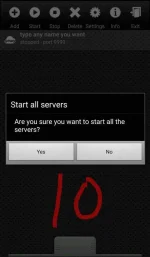
Step 9: set up your wifi hotspot in android settings and turn on, go back to proxy server click start then yes ( see picture 9 and 10)
sa mga gusto mag connect sayo follow instructions below.
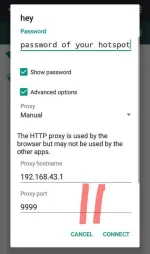
go to wifi, wag mo muna i connect. go to advanced options set proxy to manual then type 192.168.43.1 sa proxy port naman 9999. set your password then connect na. ( see picture 11)
sa mga gusto mag connect gamit pc hanapin niyo lang yung proxy 192.168.43.1 sa host then sa port 9999
like and like Sana makatulong sa inyo
Step 1: turn on your mobile data and connect your vpn app (HTTP INJECTOR, PSIPHON, POSTERN, etc...)
Step 2: download the app proxy server in playstore. (see picture 1)
Step 3: open proxy server app. click add, click proxy server then go to settings tab katabi ng rules and type any name you want in server name. (see picture 2 and 3)
Step 4: put 9999 on run on port ( see picture 3)
Step 5: put 99999999 on Connection timeout ( see picture 4)
Step 6: go to rules then click add then type 192.168 on host (see picture 5 and 6)
Step 7: go to forward to host then put 127.0.0.1, then forward to port type 1080 ( see picture 6)
Step 8: press back then save, back again then save ( see picture 7 and 8)
Step 9: set up your wifi hotspot in android settings and turn on, go back to proxy server click start then yes ( see picture 9 and 10)
sa mga gusto mag connect sayo follow instructions below.
go to wifi, wag mo muna i connect. go to advanced options set proxy to manual then type 192.168.43.1 sa proxy port naman 9999. set your password then connect na. ( see picture 11)
sa mga gusto mag connect gamit pc hanapin niyo lang yung proxy 192.168.43.1 sa host then sa port 9999
like and like Sana makatulong sa inyo
Attachments
-
 FB_IMG_1504715224586.webp61.7 KB · Views: 115
 -
 FB_IMG_1504715233924.webp107.3 KB · Views: 98
 -
 FB_IMG_1504715240084.webp125.4 KB · Views: 109
 -
 FB_IMG_1504715246439.webp146.4 KB · Views: 106
 -
 FB_IMG_1504715253141.webp96.9 KB · Views: 111
 -
 FB_IMG_1504715259997.webp128.2 KB · Views: 102
 -
 FB_IMG_1504715266454.webp71.1 KB · Views: 112
 -
 FB_IMG_1504715275853.webp53.1 KB · Views: 110
 -
 FB_IMG_1504715282860.webp37.5 KB · Views: 117
 -
 FB_IMG_1504715287778.webp64.6 KB · Views: 117
 -
 FB_IMG_1504715294414.webp40.2 KB · Views: 90