 PH
PHDora The Explorer
Forum Guru
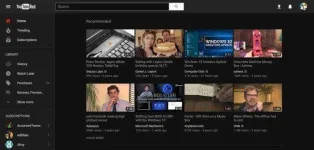
Here’s how to activate YouTube’s ‘Dark Mode’
YouTube, the most popular video streaming website, is testing a new ‘dark mode’ feature that is expected to cause less strain to the user’s eyes while watching YouTube videos at night time or dimly-lit environments.
Discovered by a You do not have permission to view the full content of this post. Log in or register now., this feature is currently hidden to most of the users. The dark mode feature turns all the light surfaces into dark ones to create a pleasant viewing experience in the dark. Also, activating YouTube Dark mode improves the overall look and feel of the website. The dark mode feature is still in its testing stage and has yet to be officially announced by Google-owned YouTube.
Here’s how you can activate the dark mode feature:
- To use this feature, you should have the updated version of Chrome browser (that’s version 57 onwards) installed on your device.
- After updating the browser, visit the YouTube website and log in using your username and password.
- To open the Developers Tool window, click on Ctrl + Shift + I on Windows, or Option + Command + I on Mac.
- Select and click on “Console” tab, then click on input box and copy paste the code mentioned below:
- cookie=”VISITOR_INFO1_LIVE=fPQ4jCL6EiE”
- Click on Enter, then close the Developers Option Window and refresh your browser.
- Clicking on the profile icon at the top right corner of the website will now display a more extensive list of options, including the dark mode feature. You can Toggle ON/OFF to activate or deactivate the feature.
We hope that the hidden dark mode feature is officially rolled out by Google soon so that watching long hours of YouTube videos would end up being a wonderful experience for the eyes of its users and not a stressful one!!!
Currently, YouTube is home to more than 1 billion users around the world, with more than 1 billion hours of videos being watched on a daily basis.