🔒 Closed Usb wifi adapter into a wifi hotspot

Status
Not open for further replies.

VME

Fanatic
Maganda ito para sa mga palaging nasa internet cafe at gustong maka access ng internet sa phone.
ito gamit ko na adapter: You do not have permission to view the full content of this post. Log in or register now.

Please follow these steps for creating hotspot for usb adapter.
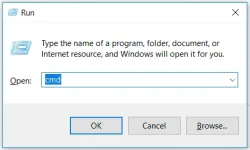
  1. Press the "Windows key" and "R" buttons at the same time.
  2. Type"cmd" in the box then hit"Enter" or OK. The Command Prompt will pop up, with Administrative Privileges.
Untitled.webp
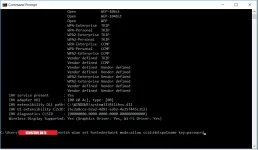
  1. Type netsh wlan show drivers in command prompt and press enter.
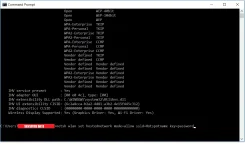
  2. Type netsh wlan set hostednetwork mode=allow ssid=Hotspotname key=password in Command prompt.
NOTE: This will create a Hotspot but it is currently offline.
Untitled2.webp
  1. Type netsh wlan start hostednetwork in command prompt to start the hotspot you just created.
 

Attachments

  • upload_2017-8-29_22-57-8.webp
    upload_2017-8-29_22-57-8.webp
    56.3 KB · Views: 12
pwedeng pwede po yan sir pero recommend ko download niyo nalang yung official utility niya kasi mas madali isetup. You do not have permission to view the full content of this post. Log in or register now.
 
pano po kung mahigpit security sa net cafe maraming naka hide na app like the taskmanager and the Run dialog box and etc..
thanks..
 
pano po kung mahigpit security sa net cafe maraming naka hide na app like the taskmanager and the Run dialog box and etc..
thanks..
download niyo nalang po drivers ng adapter ninyo, kadalasan po may dalang app na yan siya tas one click press nalang doon ang paggawa ng wifi- itype niyo lang "name of wifi and password"
 
Status
Not open for further replies.

About this Thread

  • 8
    Replies
  • 198
    Views
  • 7
    Participants
Last reply from:
VME

Trending Topics

Online now

Members online
299
Guests online
1,559
Total visitors
1,858

Forum statistics

Threads
2,293,556
Posts
29,084,715
Members
1,208,849
Latest member
sayotengkahoy
Back
Top