PH
PHInternet Download Manager being one of the conventional downloaders that help you to boost up your downloading speed in your PC. Also, the best part of IDM is its capability to resume any download. And today we are here with the cool method that will help you inincreasing the download speed of Internet Download manager. So, you have to follow some of the simple steps below to boost up your download speed in IDM.
Mapapabilis mo pa si idm..by altering Settings In IDM
Step 1. First of launch your Internet Download Manager and click on Downloads and then make the Speed Limiter off.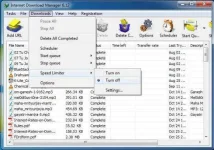
Step 2. Now again click on Downloads and in Speed Limiter click on Settings. Now there set the speed with little less than your connection speed. Better is to set it from 1000 KB to 10000 KB.

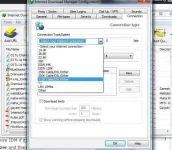
Step 3. Now again click on downloads button and choose options. There under Connection tab select the best Connection type/speed. Click on anok button to save up all the changes.
That’s it! you are done, now your download speed will get boost up.
Source from: Shubham
Follow me for more unusual tricks and tricks...

GAM3OVER
Mapapabilis mo pa si idm..by altering Settings In IDM
Step 1. First of launch your Internet Download Manager and click on Downloads and then make the Speed Limiter off.
Step 2. Now again click on Downloads and in Speed Limiter click on Settings. Now there set the speed with little less than your connection speed. Better is to set it from 1000 KB to 10000 KB.
Step 3. Now again click on downloads button and choose options. There under Connection tab select the best Connection type/speed. Click on anok button to save up all the changes.
That’s it! you are done, now your download speed will get boost up.
Source from: Shubham
Follow me for more unusual tricks and tricks...
GAM3OVER