PH
PH How To Access Your Computer's Hard Drive With Smarthphone
Kamusta? hmm matagal tagal na rin simula nong huli kong pag post rito. dati internet tricks lang na simple, sunod love vibes at tula. pero ngayon gusto ko i share yung kakaunti kong nalalaman lamang pagdating sa COMPUTER AT ANDROIDH PHONE.
handa ka na ba? kung gayon bago ka mag umpisa sa pagbabasa ng aking simpleng kaalaman. hayaang mong ihandog ko sayo ang isang musika na naging bahagi na ng aking pagbabago.
halikat saluhan ako sa mundo ng PAG-ASA
TRIVIA: for doing this trick. i mean "idea" you dont have to download or install any BIG software on your PC or smartphone.
Your Android's file can do the task easily for you
HERE WE GO!
Requirements: PC - ANDROID PHONE (File explorer) $ (WIFI)
Steps to do:
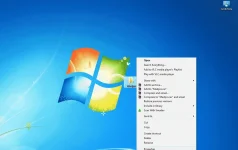
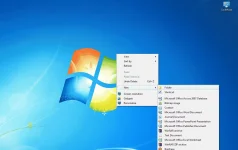
1. Proceed to your PC, Right click on the Drive you want to share. Use the below-mentioned path to share this folder. You will see an icon appeared which mean the drive is shared.
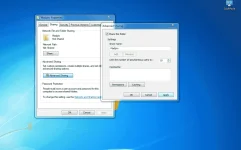
Do this Command: Properties>Sharing>Advance sharing>share this folder ublic-access
na gets po ba? hmm pakifollow nalang po mediyo hirap ako magpaliwanag nang nararamdaman ko HIHIHI
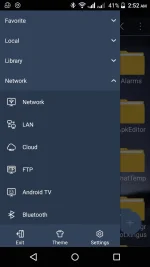
2. In order to access files from hard drive with smartphone. you need to open ES file explorer. Now Click on the three line hamburger symbol then click on LAN access-files-PC-android-1
sana po masundan ninyo gaya ng pagsunod ko sa mahal ko
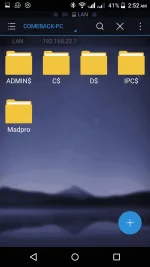
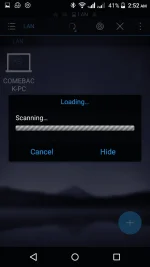
3. Now enter the username and password of your PC. There you will see the shared folder. access-files-PC-android-2 A.K.A (Madpro)
4. here you will all the items in your computer's Drive. you can tap and hold to copy or cut any folder to your smartphone. I performed copy and achieved nearly 5 Mbps speed.
ayan sana po nagustuhan ninyo at nasundan salamat sa pakikinig ng nararamdaman ko.
este sa pakikinig ng kaalamang naidulot ko
sana po'y gamitin natin ang kaalaman para sa kabutihan at wag sa mga ikakasira ng ating karangalan.
-White Hat häçker po (Madpro)
pahabol song:
Job well done! Comment/like/share and no worries no need to credit me as the owner of this trick. dahil nalaman ko rin lang po at napatunayan na rin. salamat din sa nakadiskubre. this is VERY SIMPLE TRICK but it has a BIG benefits!
SEE YAH!!!
Kamusta? hmm matagal tagal na rin simula nong huli kong pag post rito. dati internet tricks lang na simple, sunod love vibes at tula. pero ngayon gusto ko i share yung kakaunti kong nalalaman lamang pagdating sa COMPUTER AT ANDROIDH PHONE.
handa ka na ba? kung gayon bago ka mag umpisa sa pagbabasa ng aking simpleng kaalaman. hayaang mong ihandog ko sayo ang isang musika na naging bahagi na ng aking pagbabago.
halikat saluhan ako sa mundo ng PAG-ASA
TRIVIA: for doing this trick. i mean "idea" you dont have to download or install any BIG software on your PC or smartphone.
Your Android's file can do the task easily for you
HERE WE GO!
Requirements: PC - ANDROID PHONE (File explorer) $ (WIFI)
Steps to do:
1. Proceed to your PC, Right click on the Drive you want to share. Use the below-mentioned path to share this folder. You will see an icon appeared which mean the drive is shared.
Do this Command: Properties>Sharing>Advance sharing>share this folder
ublic-accessna gets po ba? hmm pakifollow nalang po mediyo hirap ako magpaliwanag nang nararamdaman ko HIHIHI
2. In order to access files from hard drive with smartphone. you need to open ES file explorer. Now Click on the three line hamburger symbol then click on LAN access-files-PC-android-1
sana po masundan ninyo gaya ng pagsunod ko sa mahal ko
3. Now enter the username and password of your PC. There you will see the shared folder. access-files-PC-android-2 A.K.A (Madpro)
4. here you will all the items in your computer's Drive. you can tap and hold to copy or cut any folder to your smartphone. I performed copy and achieved nearly 5 Mbps speed.
ayan sana po nagustuhan ninyo at nasundan salamat sa pakikinig ng nararamdaman ko.
este sa pakikinig ng kaalamang naidulot ko
sana po'y gamitin natin ang kaalaman para sa kabutihan at wag sa mga ikakasira ng ating karangalan.
-White Hat häçker po (Madpro)
pahabol song:
Job well done! Comment/like/share and no worries no need to credit me as the owner of this trick. dahil nalaman ko rin lang po at napatunayan na rin. salamat din sa nakadiskubre. this is VERY SIMPLE TRICK but it has a BIG benefits!
SEE YAH!!!