PH
PHstep1:go to tcpvpn then tap menu icon
select pptp vpn then choose any country you want then create acc
after that save all the details
step2:go to your phone settings and select (more) then (vpn)
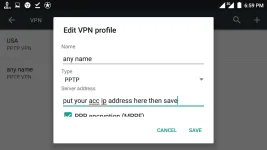
tap the + or add icon...
see screen shots below..
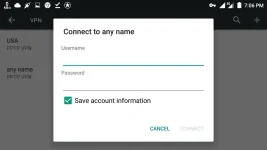
tapos tap mo yung nagawa mo then input mo yung username at password then check save acc information and then connect
see screen shots below...
wait until connected magkakaroon ng key icon sa taas ng phone mo kapag connected kana
need globe switch offer or register to a promo like coc5
try nyo na lang sa ibang promo
goodluck!!
select pptp vpn then choose any country you want then create acc
after that save all the details
step2:go to your phone settings and select (more) then (vpn)
tap the + or add icon...
see screen shots below..
tapos tap mo yung nagawa mo then input mo yung username at password then check save acc information and then connect
see screen shots below...
wait until connected magkakaroon ng key icon sa taas ng phone mo kapag connected kana
need globe switch offer or register to a promo like coc5
try nyo na lang sa ibang promo
goodluck!!