PH
PH5 cmd tricks
to use cmd just seach in start
1
Use Function Keys
You can use function keys (F1, F2, F3, etc.) right inside command prompt and get different results. Below are the uses of functions keys in Command Prompt:
Save a Command to a File
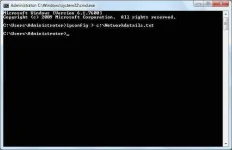
If you want to save results of a command to a .txt for future reference, then it is quite easy as well. All you need to do is add “> (destination/file name with .txt extension)” at the end of the command you are about to execute.
For example, you can type “ipconfig > c:\Networkdetails.txt”, this command will create a .txt file in C drive with name “Networkdetails”.
3
Check IP address of any Website
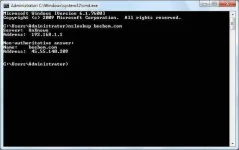
You can see IP address of any website just by entering “nslookup” command along with the name of the website. For example, you can type “nslookup beebom.com” to find its IP address.
4
. Change Command Prompt Color
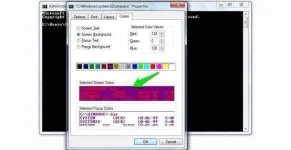
You can also change command prompt color to make it look less dull and a bit easy on the eyes. To do so, right-click at the top corners of Command Prompt and select “Properties” from the menu. In the properties, navigate to “Colors” tab and you will find all the options to change color of both text and background.
5.
Create Undelete-able Folders
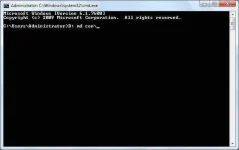
You can create undeletable folders using specific set of keywords. In the Command Prompt, type the name of the drive where you want to create the folder (it must not have Windows installed in it). After that, type any of these keywords “md con\” or “md lpt1\” and press Enter. So it should look something like this “D: md con\”.
This will create a folder with the same name that could not be deleted or renamed. To delete the folder replace “md con\” with “rd con\” or “md lpt1\” with “rd lpt1\”.
to use cmd just seach in start
1
Use Function Keys
You can use function keys (F1, F2, F3, etc.) right inside command prompt and get different results. Below are the uses of functions keys in Command Prompt:
- F1: Pastes per character last used command
- F2: Pastes last used command only to a specified command character
- F3: Pastes Last used command
- F4: Delete command only to a specified command character
- F5: Pastes last used command without cycling
- F6: Pastes ^Z
- F7: Provides a list of already used commands (selectable)
- F:8 Pastes cycleable used commands
- F9: Will let you paste command from the list of recently used commands
Save a Command to a File
If you want to save results of a command to a .txt for future reference, then it is quite easy as well. All you need to do is add “> (destination/file name with .txt extension)” at the end of the command you are about to execute.
For example, you can type “ipconfig > c:\Networkdetails.txt”, this command will create a .txt file in C drive with name “Networkdetails”.
3
Check IP address of any Website
You can see IP address of any website just by entering “nslookup” command along with the name of the website. For example, you can type “nslookup beebom.com” to find its IP address.
4
. Change Command Prompt Color
You can also change command prompt color to make it look less dull and a bit easy on the eyes. To do so, right-click at the top corners of Command Prompt and select “Properties” from the menu. In the properties, navigate to “Colors” tab and you will find all the options to change color of both text and background.
5.
Create Undelete-able Folders
You can create undeletable folders using specific set of keywords. In the Command Prompt, type the name of the drive where you want to create the folder (it must not have Windows installed in it). After that, type any of these keywords “md con\” or “md lpt1\” and press Enter. So it should look something like this “D: md con\”.
This will create a folder with the same name that could not be deleted or renamed. To delete the folder replace “md con\” with “rd con\” or “md lpt1\” with “rd lpt1\”.