 PH
PHSenpaiKhira29
Honorary Poster
Steps:
1. Create free SSH account online (e.g. FastSSH, BestVPNSSH etc.)
2. After you create, take note of your account details like hostname, port, username and password (we will use this is HTTP Injector settings)
3. Open you HTTP Injector app, go to SSH Settings then input your account details noted in step No.2.
4. Click back and go to Payload Generator:
5. Click Generate Payload.
6. Click Save and check DNS (Google DNS) option and Start SSH.
7. Turn on your mobile data before click Start button to connect to the internet.
That’s it
To save your configuration, just use the export config option on then it will save as your own .ehi file. If the current setup doesn’t work on your network you can try another proxy server and port or try another APN then test again by click start button until you get connected status in log tab.
APN to use for HTTP Injector:
Go to Settings, more / Mobile networks then Access point names and select the right APN:
Globe/TM: http.globe.com.ph, You do not have permission to view the full content of this post. Log in or register now., internet.abs-cbn.com.ph
Smart/ Talk N Text / Sun: internet, wap, minternet
Please note that free SSH account may only work for 5 to 7 days, so you need to create a new one after you login expires. Just follow the same procedure above when you create another .ehi file configurations. If your settings is working you can also share it with other device by simply using the import config option on HTT Injector.
1. Create free SSH account online (e.g. FastSSH, BestVPNSSH etc.)
2. After you create, take note of your account details like hostname, port, username and password (we will use this is HTTP Injector settings)
3. Open you HTTP Injector app, go to SSH Settings then input your account details noted in step No.2.
4. Click back and go to Payload Generator:
- Payload: tick Normal/Split
- URL/Host: any proxy server or free sites from Globe/TM and Smart/TNT (ex. M.facebook.com)
- Request Method: Connect
- Injection Method: Normal
- Query method: NA
- Extra header: Check Online Host, Forward host and Keep Alive
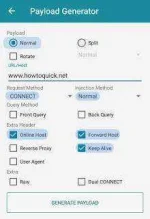
5. Click Generate Payload.
- Input Remote Proxy:
- Proxy IP/Host = your network APN proxy or work proxy server
- Port = Proxy port number e.g. 80, 8080, 3128 etc.
6. Click Save and check DNS (Google DNS) option and Start SSH.
7. Turn on your mobile data before click Start button to connect to the internet.
That’s it
To save your configuration, just use the export config option on then it will save as your own .ehi file. If the current setup doesn’t work on your network you can try another proxy server and port or try another APN then test again by click start button until you get connected status in log tab.
APN to use for HTTP Injector:
Go to Settings, more / Mobile networks then Access point names and select the right APN:
Globe/TM: http.globe.com.ph, You do not have permission to view the full content of this post. Log in or register now., internet.abs-cbn.com.ph
Smart/ Talk N Text / Sun: internet, wap, minternet
Please note that free SSH account may only work for 5 to 7 days, so you need to create a new one after you login expires. Just follow the same procedure above when you create another .ehi file configurations. If your settings is working you can also share it with other device by simply using the import config option on HTT Injector.

 palaging status moved to 302 temporarily..