PH
PHMulti-Server Connections
Requirements:
1] Download the requirements app then install (skip kung meron na)
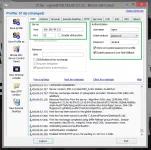
2] Open Bitvise go to Login tab, input your ssh sever details. See image below

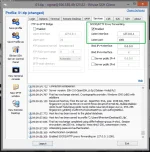
3] Go to Services tab, for Listen Interface : 127.0.0.1 and Listen Port : 1081
Note:
Yung listen port i-adjust mo yan kung ilang sever gagawin mo. Kung magdadag ka pa ng iba palitan lang yun 1081 to 1082, 1083, 1084 etc..., para sa iba server.

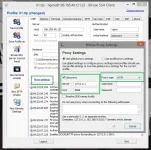
4] Back to Login tab, go to Proxy Settings. Follow the image below.

5] At the left side of bitvise, select Save Profile As (save anyname).
6] Exit muna si bitvise.
Dagdagan mo na lang kung ilang gusto mong gawin na server.
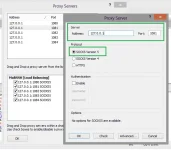
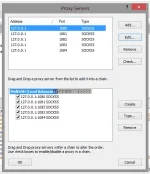
7] Open Proxifier, go to Profile tab > Proxy Servers > Add See image below:
Dun sa port like na mention ko before palitan na lang kung anong port na nakalagay sa sever.

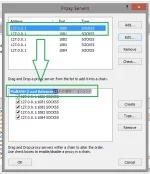
8] Proxy Servers settings pa rin, select Create input anyname.
9] Drag down yung mga nagawang proxy servers dun mismo sa ginawa mo name.
10] Afer mo malagay lahat ng server, Select Type sa Chain type Check Each connections.... sa Load Balancing. then OK Ok.

11] Proxifier pa rin, balik sa Profile tab > Proxification Rules > select Add

12] Proxification Rules pa rin, sa Default select Chain Anyname
(yung multi-server piliin mo dito) then OK.
13] Profile tab ulit, select Advance > Services and Other Users... > Check yung dalawa sa Additional Proxifier targets.
14] Done, export muna ginawa mong file.
15] Finally, Open Http Proxy Injector (make sure meron na yan working config/payload).
16] Open ulit si Proxifier import yung kanina ginawa mong file at yung mga server na ginawa mo sa bitvise open mo lahat yan ang i login.
17] Sa http proxy injector naman uncheck Tunnel then Start. Boom tapos na!
Wait mo na lang magkonek yan lahat ng server mo ginawa.
Ayusin ko na lang mamaya... may gagawin pa eh.
Requirements:
- You do not have permission to view the full content of this post. Log in or register now.
- You do not have permission to view the full content of this post. Log in or register now.
- You do not have permission to view the full content of this post. Log in or register now.
1] Download the requirements app then install (skip kung meron na)
2] Open Bitvise go to Login tab, input your ssh sever details. See image below
3] Go to Services tab, for Listen Interface : 127.0.0.1 and Listen Port : 1081
Note:
Yung listen port i-adjust mo yan kung ilang sever gagawin mo. Kung magdadag ka pa ng iba palitan lang yun 1081 to 1082, 1083, 1084 etc..., para sa iba server.
4] Back to Login tab, go to Proxy Settings. Follow the image below.
5] At the left side of bitvise, select Save Profile As (save anyname).
6] Exit muna si bitvise.
Dagdagan mo na lang kung ilang gusto mong gawin na server.
7] Open Proxifier, go to Profile tab > Proxy Servers > Add See image below:
Dun sa port like na mention ko before palitan na lang kung anong port na nakalagay sa sever.
8] Proxy Servers settings pa rin, select Create input anyname.
9] Drag down yung mga nagawang proxy servers dun mismo sa ginawa mo name.
10] Afer mo malagay lahat ng server, Select Type sa Chain type Check Each connections.... sa Load Balancing. then OK Ok.
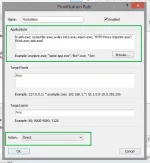
11] Proxifier pa rin, balik sa Profile tab > Proxification Rules > select Add
- Name : anyname
- Applications copy and paste this :
Code:
bvssh.exe; co2surfer.exe; a-dev1412.exe; inject.exe; "HTTP Proxy Injector.exe"; PLink.exe; ssh.exe- Action select Direct
12] Proxification Rules pa rin, sa Default select Chain Anyname
(yung multi-server piliin mo dito) then OK.
13] Profile tab ulit, select Advance > Services and Other Users... > Check yung dalawa sa Additional Proxifier targets.
14] Done, export muna ginawa mong file.
15] Finally, Open Http Proxy Injector (make sure meron na yan working config/payload).
16] Open ulit si Proxifier import yung kanina ginawa mong file at yung mga server na ginawa mo sa bitvise open mo lahat yan ang i login.
17] Sa http proxy injector naman uncheck Tunnel then Start. Boom tapos na!
Wait mo na lang magkonek yan lahat ng server mo ginawa.
Ayusin ko na lang mamaya... may gagawin pa eh.